

Introducing Octen Pulse Search: Turn the Web into AI Memory
Pulse Search is Octen's new web search API. Each search takes about 10 ms, and pricing starts at $0.10 per 1,000 calls. Search stops being a tool AI has to pause for, and becomes its memory.
 Kunka
Kunka
Until now, web search has been a tool for AI. The model stops mid-reasoning, sends a search request, and waits for the results before it can carry on. The more it searches, the longer it waits.
Pulse Search changes that. A query has a median server-side latency of about 10 ms, roughly the time an LLM takes to generate a single token.
It's fast because the model behind it doesn't look pages up. It remembers them. Our generative retrieval model, Octen-WebGR-4B, stores 200 million web pages in its parameters: give it a query and it writes out the address of the page you want. The web becomes part of AI's memory. That's what we set out to do: turn the web into AI memory.
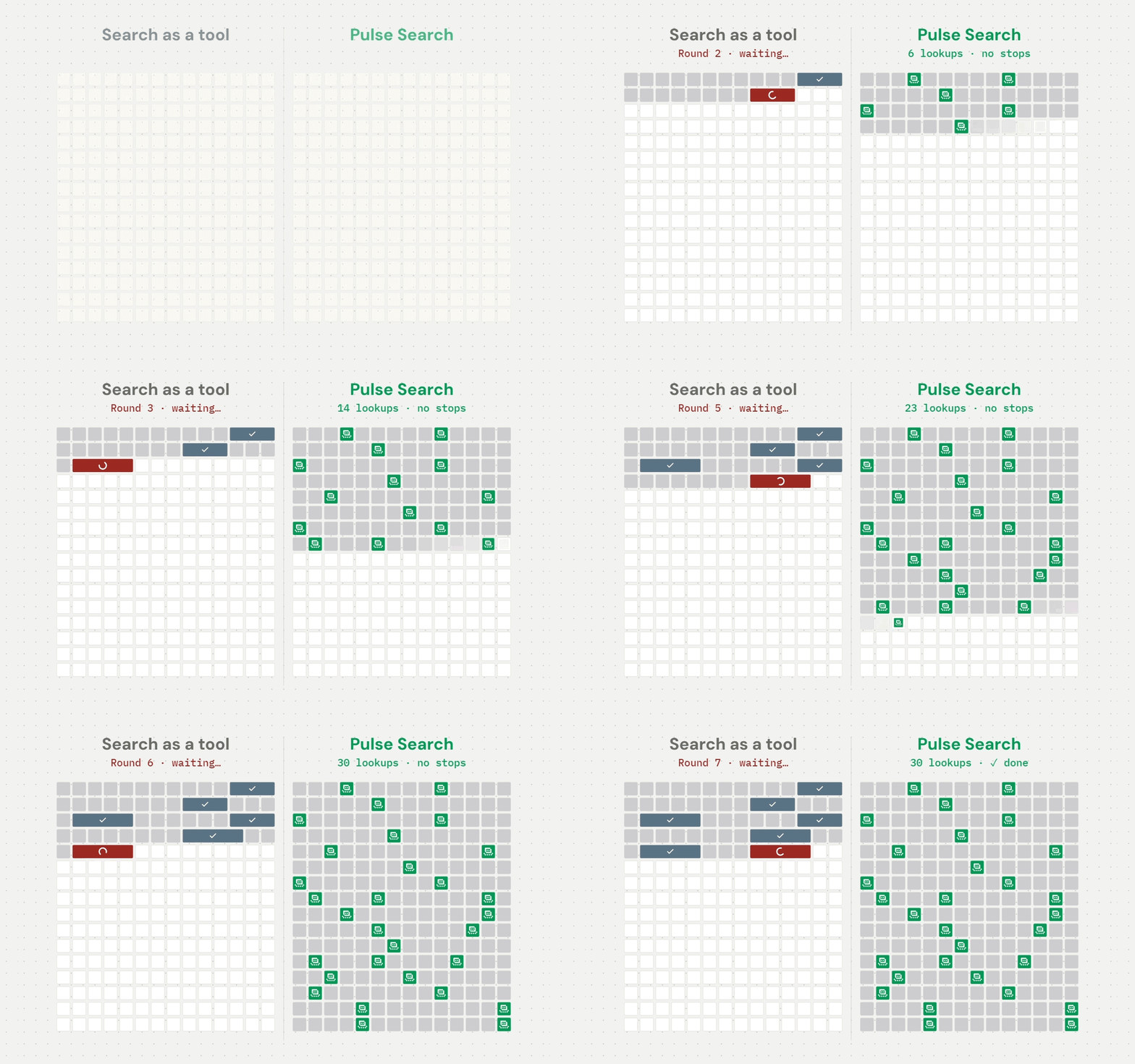
Before: search as a tool
Traditional search is a pipeline: understand the query, retrieve candidates from an index, pre-rank them, re-rank them, and return the results. Every step takes time, and a search API call typically takes 100 ms or more.
For a model, those 100 ms are a full interruption. It stops mid-output to call a search tool, waits for the results, reads them, and only then continues. A task that searches dozens of times spends seconds just waiting. So developers ration search: they debounce input boxes, queue batch jobs, and cap how many searches an agent can make.
Having an LLM write URLs from memory doesn't work either. In our tests, even the best frontier model put the right page first only 37.5% of the time, and just 38% to 61% of the URLs the models wrote were real pages that people actually visit.
Now: the model is the index
Pulse Search uses generative retrieval, where the model itself is the index: give it a query, and a single inference writes out the ID of the target page, which a table lookup then turns into a URL.
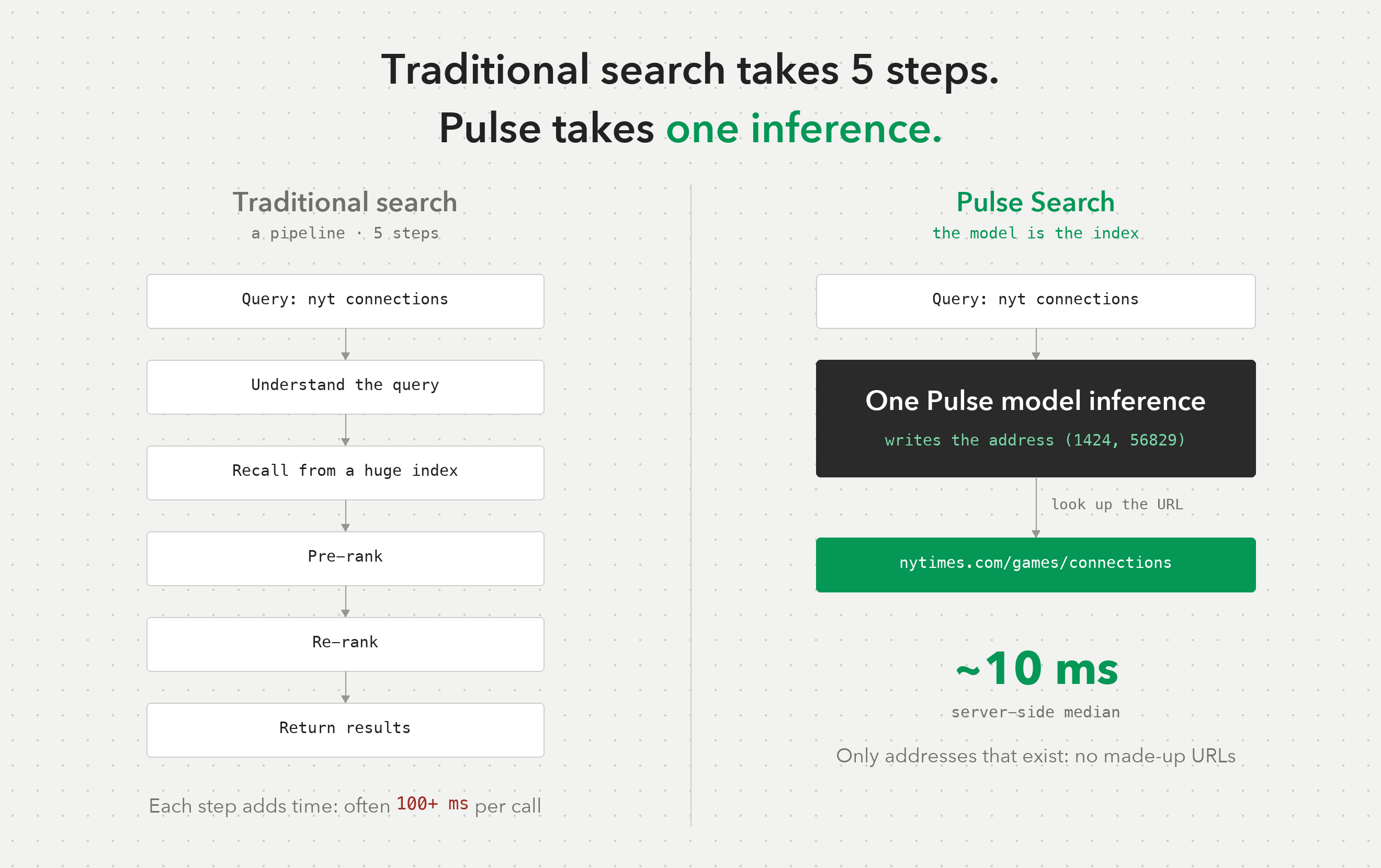
Think of that ID as a street address made of two numbers. The first is like a neighborhood: pages with similar content live in the same one. The second is like a house number, unique within its neighborhood. The New York Times' Connections word game, nytimes.com/games/connections, for example, lives at (1424, 56829).
The model learns its way around from experience. We train it on aggregated click data that contains no user identifiers, and from that data it learns that people who type “nyt connections” are looking for that game page.
There's also a hard rule: the model can only write addresses that exist in the ID table. So every result Pulse Search returns is a real web page. It never makes up a URL.
Search stops being a pause in reasoning and becomes part of thinking: in the time an LLM takes to write one token, it can run a search.
What you can build
At about 10 ms per search, with every result a real page, search can be always on and barely noticeable. Applications once held back by search latency and cost can now search more often without slowing users down.
LLMs that search as they reason. Search can go straight into the reasoning process: dozens of lookups in one pass take only a few hundred milliseconds in total, and reasoning never has to stop. The model also stops guessing URLs from memory. Asked “Is GitHub down?”, it finds githubstatus.com on the spot; say “I forgot my Apple ID password” and it goes straight to Apple's reset guide, support.apple.com/en-us/102656.
Search on every keystroke. Search is fast enough to skip debouncing, so every keystroke can send a request. That makes it a fit for a ⌘K command bar that covers the whole web, or an address bar that understands names: type “chatgtp” or “네이버” and go straight to the site. Voice assistants, TVs and in-car systems work the same way: say a name and you're there.
Fill in URLs in bulk. Queries are fast and cheap enough to run over an entire spreadsheet: a hundred company names turn into a hundred verified official websites in real time. Add a custom Google Sheets function that calls Pulse Search, type =PULSE(A2), and the whole column of URLs fills itself in. Eight companies times seven page types (pricing, careers, docs, status, login, privacy policy, help center) make 56 lookups, returned in one batch.
Straight to the exact page. Pulse Search can return deep URLs such as pricing pages, help articles and API docs. Search “python 3.13 what's new” and you get Python's official What's New in Python 3.13 page; hover over a function name in your editor and you see its official docs. Standard mode also returns the passage that answers the question, so a support bot can answer before the user files a ticket.
It understands people and spots the real site. Typos like “amazn”, renamed products and brand names written in other scripts all resolve to the right site: 宜家, 이케아, イケア and ايكيا go to IKEA's sites for China, Korea, Japan and Saudi Arabia. And because Pulse Search knows where a brand really lives, an email link that says PayPal but points somewhere else gets caught at a glance.
See it in action
We built a set of demo apps on Pulse Search, and every result on them comes from the live API. Four of them are shown below, and the table describes each one.
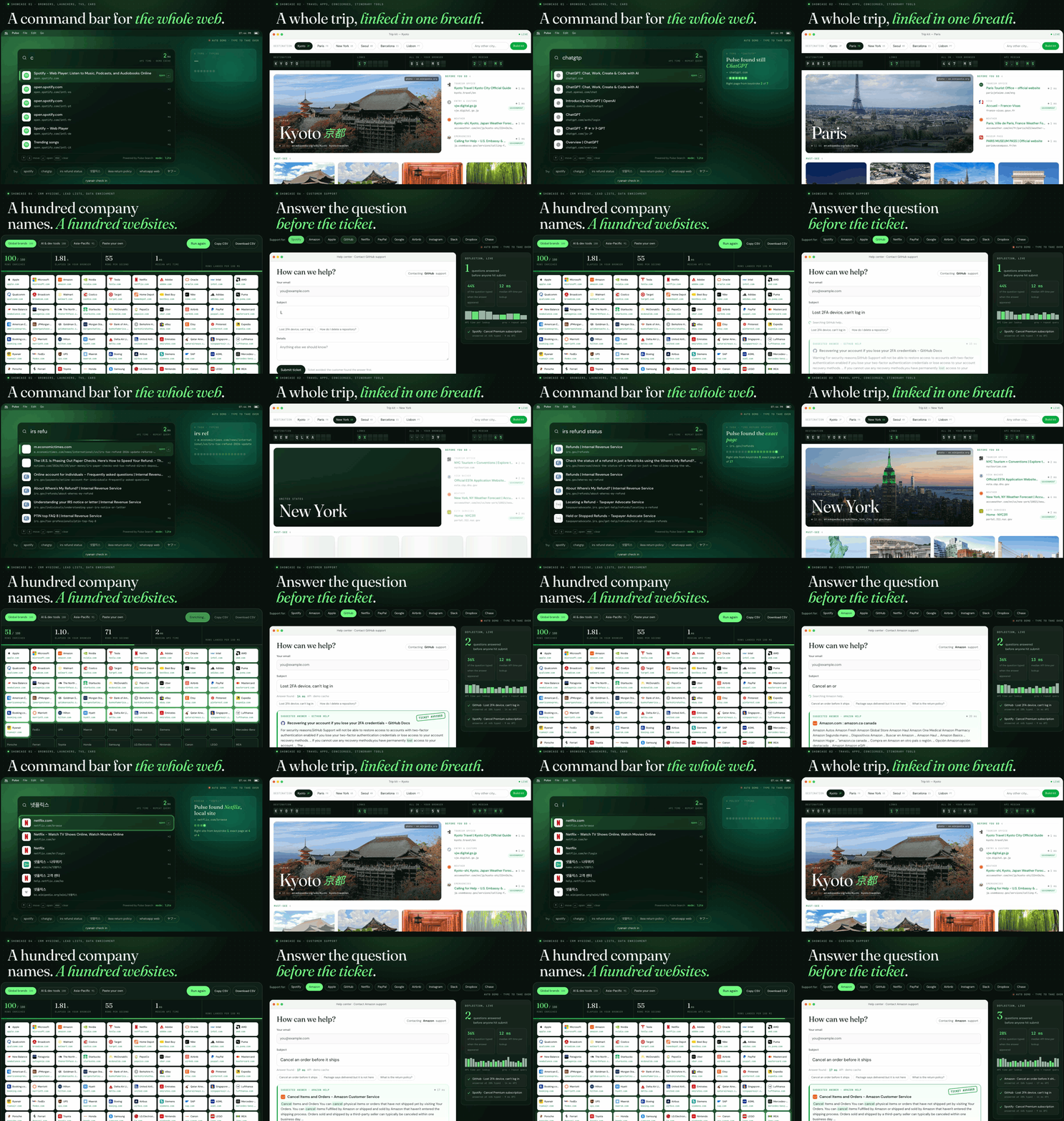
| Use case | Built for | What it does |
|---|---|---|
| Search as you type | Browsers, desktop search, smart TVs, in-car systems | Searches on every keystroke, so you can jump to the right page while you're still typing |
| Trip planning | Travel apps, itinerary planners | For any city you pick, finds the official pages for attraction tickets, transit passes, airport transfers, entry applications and weather in one go |
| Company websites in bulk | CRMs, sales lead tools | Matches a list of company names to each company's official website in seconds |
| Self-service support | Support platforms, help centers | Finds the relevant help article and the passage that answers the question while the user is still typing, so many questions never need a ticket |
Runs on-device. Because the index is the model, the smaller Octen-WebGR-0.6B (31.28 million pages memorized) fits on a laptop. We built it into a Chrome extension as an internal demo: as you type in the address bar, the dropdown shows URLs generated by the local model in real time. On an M2 Pro MacBook, each lookup takes about 30–50 ms, entirely on the device. To try it yourself, download the model from Hugging Face and run it with the open-source inference code.
The table below shows real outputs from this local model:
| You type | Top result | Why it's hard |
|---|---|---|
| netf | netflix.com | Only four letters typed |
| nyt connections | nytimes.com/games/connections | Needs one specific game page |
| irs refund status | irs.gov/refunds | The official entry point for a government service |
| esta application | esta.cbp.dhs.gov | The official application site, not a paid agency |
| dropbox login | dropbox.com/login | Straight to the login page |
| stripe pricing | stripe.com/pricing | Straight to the pricing page |
One endpoint, two modes
Send a POST request with your API key to https://api.octen.ai/pulse-search. Lite mode is built for speed; standard mode can also return more of the page's content.
| Mode | Returns | Server-side latency (P50) | Price | Best for |
|---|---|---|---|---|
| lite (default) | URL, title | 10 ms | $0.1 / 1k calls | Type-ahead, voice navigation, agents finding pages, bulk website lookup |
| standard | URL, title, favicon, author, date; optional relevant passages, full content, images | 20 ms | $0.2 / 1k calls full content $0.5 / 1k results, 1 free per call | Link previews, support Q&A, RAG |
Latency is the server-side median for queries the API hasn't seen before; repeated queries come back faster. Calling it from Python takes a few lines:
import os, requests

resp = requests.post(
    "https://api.octen.ai/pulse-search",
    headers={"X-Api-Key": os.environ["OCTEN_API_KEY"]},
    json={"query": "stripe pricing", "mode": "lite", "count": 3},
)
for r in resp.json()["data"]["results"]:
    print(r["url"], r.get("title"))
Lite returns URLs without the scheme (for example, stripe.com/pricing). Standard returns full URLs, and the highlight, full_content and include_images parameters let you fetch relevant passages, full content and images as needed.
To plug it into an agent, you can use the tool definition from our demo:
{
  "name": "pulse_search",
  "description": "Find the web page people actually go to for a query: a site, a specific page (pricing, docs, status, login, help) or the official source for a task. Returns URLs in milliseconds.",
  "input_schema": {
    "type": "object",
    "properties": {
      "query": {
        "type": "string",
        "description": "What the user wants to reach, e.g. 'github status' or 'stripe pricing'."
      },
      "mode": {
        "type": "string",
        "enum": ["lite", "standard"],
        "description": "lite: title + URL, fastest. standard: adds highlights, full content, images."
      },
      "count": { "type": "integer", "minimum": 1, "maximum": 10 }
    },
    "required": ["query"]
  }
}
By the numbers: over 90% top-1 accuracy on popular pages
We wrote up the research behind Pulse Search in a technical report, Octen-WebGR: Scaling Generative Retrieval to 200 Million Web Pages, and released two models. All the numbers below come from the report. They were measured on real search traffic from September 2026, the month after the training data ends.
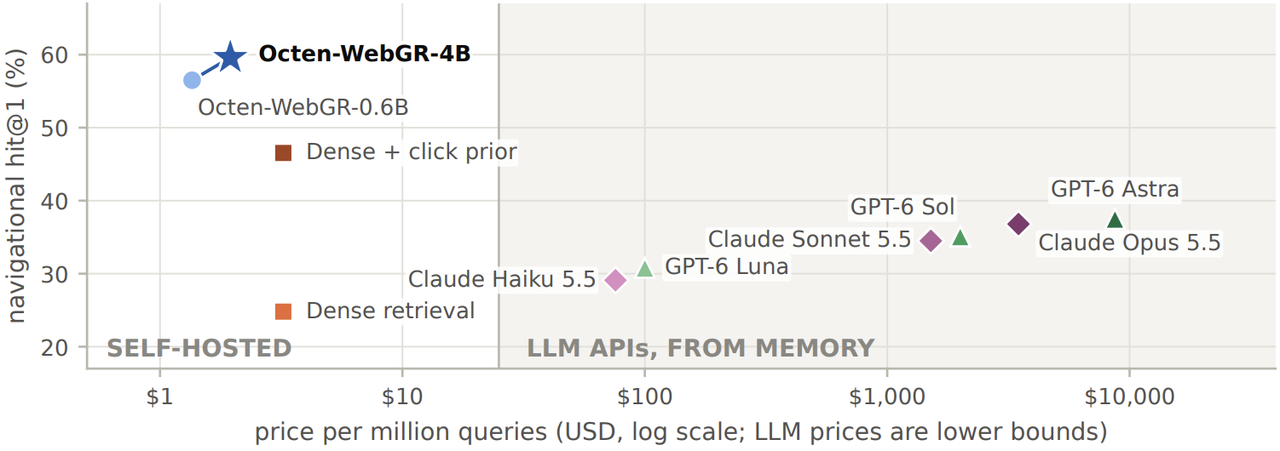
Source: Octen-WebGR technical report, Figure 1. LLM results are on a 5,000-query sample, on which Octen-WebGR-4B scores 59.8%.
Trained on the same Octen click data, generative retrieval gets the top result right 59.6% of the time, versus 46.5% for vector retrieval, about 13 points higher. LLMs answering from memory are less accurate and cost at least 40 times as much.
- Popular pages are almost always right: queries with more than 1,000 clicks a month make up 56% of navigational traffic, and top-1 accuracy on them reaches 90.4%.
- Accuracy holds up at scale: growing the candidate pool from 2 million to 200 million pages costs only 4.7 points of accuracy, versus 22.2 points for vector retrieval.
- The index is the model weights, so it takes far fewer resources: Octen-WebGR-4B has 4 billion parameters and has memorized 201,231,792 web pages, yet runs on a single GPU in about 10 GB of memory. Exact vector search at the same scale needs 412 GB of vectors in memory. The smaller Octen-WebGR-0.6B has 600 million parameters, has memorized 31.28 million pages, and needs only 1.6 GB of GPU memory.
Generative retrieval is best at finding the pages people visit often. Rarely visited pages, and pages that appeared after training, are better handled by a live index such as Octen Web Search, which shares Pulse Search's authentication and response format. The two work best together.
Get started
Pulse Search is generally available now: about 10 ms per search in lite mode, from $0.10 per 1,000 calls.
- API: the Pulse Search API docs get you connected in a few lines of code. If you already use Octen Web Search, just change the request path. You can also try it in the console.
- Tech report: Octen-WebGR: Scaling Generative Retrieval to 200 Million Web Pages covers how the models are trained, how they scale to 200 million pages, and where they fall short.
- Open source: the weights and page-ID tables for Octen-WebGR-4B and Octen-WebGR-0.6B are on Hugging Face for non-commercial use (CC BY-NC 4.0). The inference code is Apache 2.0.
Search used to be a tool AI had to stop and use. Now it can be AI's memory.

Chief Scientist of Octen AI