
Benchmark Search Latency Without Misleading Yourself: P50 vs. P95 vs. P99
Median p50 metrics ignore the tail delays breaking your agent. Measure p95 and p99 latency to reveal true LLM latency under concurrent search load.
A search API looks fast in a demo, with the response coming back in tens of milliseconds, so a team ships it. Once it reaches production, a single task can generate hundreds or thousands of searches at once. A small percentage of requests can then take much longer, and the user experience starts to degrade.
This is the recurring failure point in LLM latency benchmarking. A latency number quoted by a search API vendor is only one part of the overall latency picture, not the complete measurement. Median latency can hide the slowest requests, average latency can hide even more, and a benchmark without clearly stated test conditions can leave too much room for misleading comparisons. This is particularly important for real-time applications, where slow search responses can delay the entire agent pipeline.
This article explains how to measure latency and interpret the resulting metrics so that you can evaluate and verify vendor claims rather than accept them at face value.
What p50, p95, and p99 actually mean
Latency numbers are almost always reported as percentiles, and the percentile in question can change the story completely. Below are the percentile metrics used to measure system response times:
-
p50 (50th percentile or the median): Represents the typical user experience. It is the middle request when all response times are arranged from fastest to slowest. Exactly 50 percent of requests are faster than this time, and 50 percent are slower.
-
p95 (95th percentile): Represents the threshold for almost all regular users. Ninety-five percent of requests finish faster than this value, while the slowest five percent take longer. It serves as an early warning sign for performance issues and edge cases.
-
p99 (99th percentile): Represents the point at or below which 99 percent of search queries finish, while the remaining one percent take longer. Because it focuses on the slowest requests, P99 is a useful measure of tail latency, which refers to the time taken by slow requests at the upper end of a latency distribution. Tail latency is commonly assessed using high percentiles such as P95, P99, and beyond.
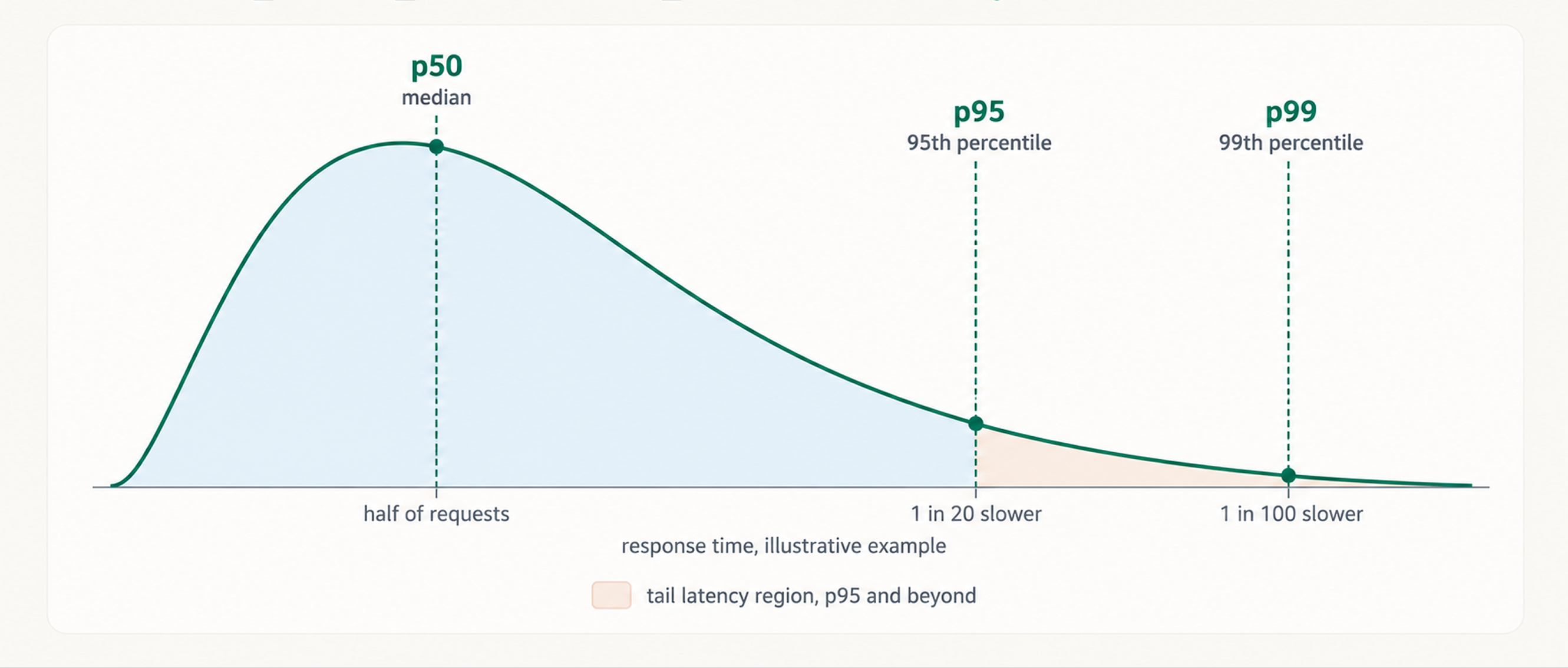
The distinction matters because p50 describes the typical request, while p95 and p99 reveal what happens toward the slow end of the distribution. A system can therefore have a great median while still producing a poor experience for a meaningful share of requests.
Why median and average both mislead
When analyzing search latency, the median and average can be confusing. The median says nothing about the tail of the requests. A system can have an excellent p50 and a terrible p99 at the same time because the median only tells us what happens in the middle of the distribution.
The average poses a different problem. A small number of very slow requests can pull the average upward, producing a number that doesn't reflect any particular request. For example, if 99 requests take 30ms and one takes 3,000ms, the average is 59.7ms. Almost every request was faster than that, while the average still fails to show how slow the outlier was.
For the way AI agents operate, these limitations matter because they can fan out many searches as part of a single task, and the slowest of those N calls can gate the entire step. The agent gets stuck at that step and can’t move to the next reasoning step until the last search returns. Chain several steps together, and tail latency can compound across the task.
For agentic workloads, the key is how often slow requests occur and how much they affect the overall task, not just how fast an individual request is. This is why monitoring p95 and p99 in production matters for agentic AI applications, since averages can look healthy while the tail degrades.
Conditions that shape latency numbers
Latency numbers can vary depending on what is being measured and the conditions under which it is measured. A useful benchmark should state these conditions clearly so that its results can be understood and compared properly.
-
Measurement boundary: Server-side latency measures how long the search service takes to process a request after it reaches the provider's infrastructure. End-to-end latency measures the time from when the application sends the request to when it receives the response, including network transit time and connection overhead.
-
Runtime state: Cold and warm requests can have different latency. A cold request arrives when required resources or connections are not yet initialized. A warm request arrives after that setup has already occurred, and the system can process it without the extra initialization overhead. If a benchmark mixes cold and warm requests without saying so, the resulting latency can be difficult to interpret. Caching is a common reason warm results look better than cold ones, since a repeated query may be served from cache.
-
Load and concurrency: A service may respond quickly to a single query but behave differently when many queries arrive at the same time. Concurrent requests can compete for shared resources or encounter queueing, increasing latency and potentially making the tail much slower.
-
Workload characteristics: Query characteristics, the number of results requested, the number of tokens added to the prompt for the model to process, and other request parameters can affect how much work the service must do. Larger result payloads also increase the amount of text downstream models must process, potentially raising LLM inference latency even when the search call itself is quick.
A benchmark should disclose these details alongside the latency measurement rather than treating the resulting number as a universal property of the API.
What a trustworthy benchmark looks like
Latency numbers become useful only when the conditions under which they were measured are made explicit. For a benchmark to be reproducible and comparable, it should disclose at least the following:
-
Test date: Infrastructure changes over time, so a number from eight months ago may no longer represent current performance.
-
Mode: The benchmark should state whether the measurement is server-side or end-to-end.
-
Query set: The actual queries used should be described or made available. A benchmark based on short, simple queries may not represent production traffic.
-
Region: Network geography can affect end-to-end latency.
-
Concurrency level: The benchmark should state how many requests were running simultaneously.
-
Result count: The number of results requested and returned per query can affect the amount of work involved.
Use the above as a checklist when judging latency numbers. A claim of low latency without these details is not a measurement to be trusted.
Honest reporting in practice
We try to report about Octen’s own performance as transparently as possible. The figures reported in this section come from different measurements and workloads, so we report each one with enough context to show what it actually measures.
-
Octen's internal server-side median latency is around 30ms as of September 21, 2026. This is a p50 measurement of the time spent processing a request within our infrastructure. It is therefore different from the end-to-end latency an application may experience. The system is designed for 1M+ concurrent queries, but this is a concurrency design target, not a claim that requests maintain 30ms latency at 1M concurrent queries.
-
Task completion time is 16.1 seconds. This is based on the Artificial Analysis Search API Benchmark (data as of October 19, 2026), which records search performance at the task level, including multiple searches within a task. The reported result is the fastest among the providers measured, and the comparison uses a single product in its default configuration, rather than an optimized configuration created specifically for the benchmark.
-
Latency is 77ms at p50 and 97ms at p90 as of July 14, 2026. Octen’s public benchmark repository records these server-reported times across 4,326 questions on SimpleQA.
-
Quality score of 77. The Artificial Analysis Search Index gives Octen a quality score of 77, based on the equal-weighted mean of DeepSearchQA F1, BrowseComp accuracy, and AA-Omniscience accuracy. This score reflects Octen's search quality.
How to run your own latency test
Before running the test, check whether the API plan or tier can sustain the required request volume. If the provider's rate limit is below the intended test concurrency, requests may queue instead of running simultaneously. The test also needs enough requests to produce meaningful percentiles. A handful of manual queries can confirm an API works, but they aren't enough to establish a credible p95 or p99.
To test latency, follow these steps:
-
Collect real queries, not synthetic ones. Pull at least 1,000 representative queries from production logs or the agent's tool-call history. The query set should reflect the size of the workload the system will actually handle. If the agent generates queries from user prompts, sample those prompts too to preserve the patterns and variety of real-world usage.
-
Match production concurrency. If the agent typically fans out 20 searches at once, the test should reproduce that concurrency rather than sending the queries sequentially.
-
Measure both ends of the call. Record end-to-end latency from inside the calling application, starting when the request is sent and ending when the response arrives. If the provider exposes server-side timing, record that separately.
-
Calculate p50, p95, and p99. Once every request response time has been recorded, calculate the three percentiles rather than relying on the average. Report p99 latency explicitly, since it is the figure most likely to expose queueing and slow outliers.
-
Repeat the test. A single run can be noisy. Run the test three to five times, ideally at different times of day, and draw a different set of queries for each run so cached responses don't flatter the results. Rerun the test after every change to determine whether a latency optimization actually helped. If the production workload repeats queries often, run a separate warm-cache pass and report it apart from the cold one.
-
Record the benchmark conditions. Every result should include the test date, measurement mode, query set, region, concurrency level, result count, and any quality judge used. If the returned content is capped, note the token limit per result as well. Without these conditions recorded, the result becomes difficult to reproduce or compare later.
To get started, Octen's open-source latency benchmark can send queries at set QPS levels, record client-side time and, for Octen, server-side time, and calculate p50, p90, and p99 from the results. It can also read your own query file instead of its default set.
The output should not be a single number. It should be a small table showing p50, p95, and p99 for both server-side and end-to-end latency at a concurrency level that matches production, with each row labeled cold or warm. If the test also covers the model that consumes the search results, the results should be tracked in a separate table. Tokens per second (token generation speed) should be recorded separately from request latency, while streaming responses should report time to first token (TTFT) and total response time separately. A single figure would hide whether the delay comes from the search call, the prompt processing, or the generation itself.
The takeaway
Search latency should be judged by the tail and by the conditions behind the number, not by a single headline figure. A fast median says little about an agent that fans out searches, because the slowest response sets the pace of the whole step. If each request has an independent one percent chance of landing in the p99 tail, a step with 20 parallel searches will hit at least one slow request about 18 percent of the time, and those delays compound across a multi-step task.
A trustworthy benchmark reports p50, p95, and p99 and discloses the test date, measurement boundary, query set, region, concurrency level, and result count. Vendor numbers that omit these details cannot be reproduced and should be treated as unverified. The most reliable check is a test on real queries at production concurrency, with server-side and end-to-end latency recorded separately. Tracking these metrics over time also helps evaluate whether their changes improve performance enough to justify the ongoing cost.
An agent moves at the speed of its slowest search. Run tests on real traffic with the Octen Search API and see where the tail lands.
Frequently Asked Questions
Does a faster search API always mean a faster agent?
No. Search is only one stage. If it returns bloated results, the model has more tokens to read before generation starts, and that can erase the savings. Time each stage separately before deciding where to optimize.
How many requests are needed for p99 latency to be meaningful?
At least 1,000 per run. With only 100 samples, p99 is effectively your single slowest request, so one outlier can swing it. With 1,000, p99 rests on the slowest ten. Aim for a few thousand across several runs.
What are the best LLM latency optimization techniques for search-powered LLM pipeline?
Start by trimming what the model has to read, such as fewer results and a token cap per result to shorten prompt processing and generation. Add caching for repeated queries, and benchmark it separately so it doesn’t flatter your cold numbers. LLM streaming won’t shorten total generation time, but it cuts perceived latency by showing output at the first token. To target the tail specifically, set a timeout and retry slow searches, since a single slow request can hold up a whole fan-out step. Remember to always measure each one alone to know which actually helped.
How can latency regression be prevented after optimization?
Treat p95 and p99 as production metrics, not one-off test results. Continuous monitoring with alerts on tail percentiles catches slowdowns that averages hide, such as a new prompt template that inflates token counts or a traffic spike that causes queueing.