
How to Add Live Web Search to an AI Agent
Build AI agent web search in one Node file: name the tool's triggers, return title, URL, date, and excerpt, and let the model decide when to search.

Ask an agent which Node.js release is currently in Active LTS, and it may give you an answer that was correct when its training data was collected but isn't true today.
That is the problem with using an LLM for anything that changes frequently. Software releases move, prices change, and companies ship new products, so today's correct answer can be wrong tomorrow.
The fix is to wire an LLM web search API into the loop. The agent can then recognize that the answer may have moved, issue a query, read the structured results that come back, and answer from those instead of from memory. What follows builds that agent with LangChain in Node, in a single file, against a single task.
We build Octen, the search API in the code below, so factor that into how much weight the recommendation gets. Every figure here links to the documentation page it came from, and the search call is one fetch inside one function, so you can point that function at another provider without touching the rest.
Here is the difference the tool makes, on the same question:
Before: "Node.js 20 is the current Active LTS release."   (confident, and out of date)
After:  "Node.js 24 is on Active LTS; Node.js 26 is Current and moves to LTS
         after its six-month Current phase."  [nodejs.org/en/about/previous-releases]
How Agent Web Search Works
Under the hood, this is just tool calling.
You give the model a tool called web_search and describe when it should use it. When the model gets a question that requires current information, it generates a search query and calls the tool.
Your application sends that query to the search API and passes the results back to the model, which reads them and uses them to answer the user. If it still needs more information, it can search again.
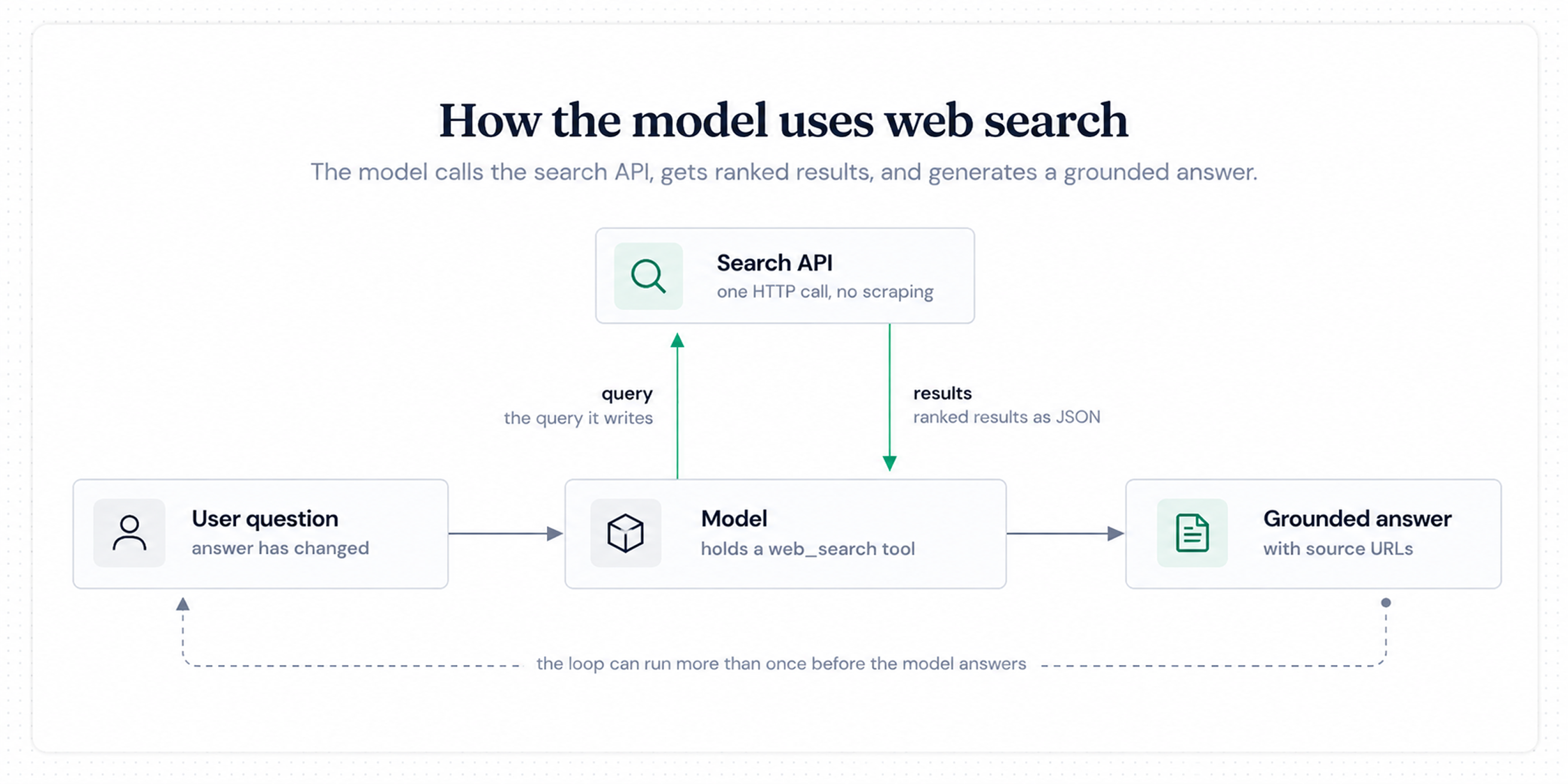
The loop for a single search tool. Every arrow except the first is a choice the model makes.
Two details determine whether the pattern works in practice: first, the model's only information about your tool is its name, description, and parameter schema, which makes that text a prompt rather than documentation. A description that says only "Search the web" produces a tool that fires on trivia and skips the questions that actually matter, while a description naming the trigger conditions, such as prices, releases, versions, and anything dated, produces a tool that fires when it should. Your system prompt does the other half of the work by telling the model to prefer searching over guessing.
The second detail is the shape of the output. An agent-facing search API returns ranked JSON, and the four fields we use below are a title, a URL, a timestamp, and a query-relevant excerpt, so the tool function formats those into a string and stops there, with nothing in the pipeline fetching HTML or stripping tags.
Prerequisites
You will need three things:
- Node.js 22 or newer
- An LLM API key for a model that supports tool calling
- An Octen API key
Node 22 is required by the current @langchain/openai package. The search integration itself uses Node's built-in fetch.
There is no Octen npm package to install. Our packaged SDK is Python, and the Node-facing distributions are the CLI and the MCP server, so you only need an API key on our side.
New accounts start on our Free plan, which allows 10 queries per second at no cost, and registration includes $5 of balance. Adding credits moves you to Base, which doubles that to 20 queries per second, still at no monthly cost. Search calls currently run at $1 per 1,000, discounted from a $5 list price, so that opening balance covers a few thousand searches at today's rate and around a thousand once the promotion ends. A run of the finished file issues one search.
Create a key on the API platform, then:
mkdir search-agent && cd search-agent
npm init -y
npm pkg set type=module
npm install langchain @langchain/openai @langchain/core zod

export OCTEN_API_KEY="your-octen-key"
export OPENAI_API_KEY="your-llm-key"
Confirm the key works before involving a model:
curl -X POST https://api.octen.ai/search \
  -H "Content-Type: application/json" \
  -H "x-api-key: $OCTEN_API_KEY" \
  -d '{"query": "node.js active lts release", "count": 3}'
A working key returns "code": 0 and a data.results array. The full request and response schema lives in the Web Search API reference. The finished code for this tutorial is in this GitHub repository.
Wire Octen Search as a Tool
The tool is one function, a Zod schema for its arguments, and a description. LangChain hands that description to the model verbatim, which is why it spends more words on when to call the tool than on what it does.
Everything in this tutorial lives in one file, agent.mjs. The block below is the search half of it, shown on its own so the pieces are readable. The complete listing comes in the next section.
import { tool } from '@langchain/core/tools';
import * as z from 'zod';

async function octenSearch(query, count = 5) {
  const response = await fetch('https://api.octen.ai/search', {
    method: 'POST',
    headers: {
      'Content-Type': 'application/json',
      'x-api-key': process.env.OCTEN_API_KEY,
    },
    body: JSON.stringify({ query, count }),
  });
  const payload = await response.json().catch(() => ({}));

  if (!response.ok || payload.code !== 0) {
    const detail = payload.msg ?? `HTTP ${response.status}`;
    console.error(`Octen search failed: ${detail}`);
    throw new Error(`Octen search failed: ${detail}`);
  }

  return payload.data?.results ?? [];
}

const webSearch = tool(
  async ({ query }) => {
    const results = await octenSearch(query);
    return (
      results
        .map(
          (r) =>
            `Title: ${r.title}\nURL: ${r.url}\n` +
            `Published: ${r.time_published ?? 'unknown'}\n` +
            `Excerpt: ${r.highlight ?? ''}`
        )
        .join('\n\n') || 'No results found.'
    );
  },
  {
    name: 'web_search',
    description: [
      'Search the live web for current information.',
      'Call this whenever the answer depends on something that changes over time,',
      'such as software versions and release schedules, prices, standings, company',
      "news, or any question containing 'now', 'latest', or 'current'. Prefer",
      'calling it over answering from memory when you are unsure.',
      'Returns up to five ranked results, each with a title, URL, publication date,',
      'and an excerpt relevant to the query.',
    ].join(' '),
    schema: z.object({
      query: z.string().describe('The search query'),
    }),
  }
);
We return a business code in the response body alongside the HTTP status, so an expired key or an exhausted quota can still come back with a 200 and a non-zero code. A helper that only checks response.ok treats that as a successful search and hands the agent an empty result set.
That is a particularly bad failure mode, because the model reads an empty array as the search finding nothing and tells your user there are no results rather than reporting that the search itself failed.
The console.error is there because LangChain catches whatever your tool throws and passes it back to the model as a tool message. The agent sees the failure and carries on, so without the log line, nothing useful reaches your terminal while you are debugging.
Each result carries title, url, highlight, authors, full_content, time_published, time_last_crawled, and favicon, and the tool above formats four of those fields into a text block and drops the rest. That is all the search-specific code the agent needs. When the highlights are too thin for a task, ask for full_content. The full content of the first ten results in every search is free, with further results billed at $0.50 per 1,000.
Three request parameters matter once you move past this example, and you set all three inside octenSearch rather than exposing them in the schema, which leaves the model deciding what to search for while you decide how widely to search. count goes up to 100 when a task calls for breadth. include_domains and exclude_domains accept up to 1,200 entries each if you want to pin an agent to sources you trust, and time_range with time_basis set to published or crawled narrows the window, which matters for news-shaped questions where a stale top result outranks the current one.
Give the Tool to Your Agent and Run One Task
LangChain's agent constructor takes a model and a list of tools and runs the loop for you. In LangChain v1 it is createAgent, exported from the langchain package. Older tutorials import createReactAgent from @langchain/langgraph/prebuilt, which still runs today and is marked deprecated in favor of createAgent, so treat it as legacy.
Here is agent.mjs in full. It contains the tool from the previous section, so paste it over what you have rather than adding to it, or you will declare webSearch twice.
// agent.mjs
import { tool } from '@langchain/core/tools';
import { ChatOpenAI } from '@langchain/openai';
import { createAgent } from 'langchain';
import * as z from 'zod';

async function octenSearch(query, count = 5) {
  const response = await fetch('https://api.octen.ai/search', {
    method: 'POST',
    headers: {
      'Content-Type': 'application/json',
      'x-api-key': process.env.OCTEN_API_KEY,
    },
    body: JSON.stringify({ query, count }),
  });
  const payload = await response.json().catch(() => ({}));

  if (!response.ok || payload.code !== 0) {
    const detail = payload.msg ?? `HTTP ${response.status}`;
    console.error(`Octen search failed: ${detail}`);
    throw new Error(`Octen search failed: ${detail}`);
  }

  return payload.data?.results ?? [];
}

const webSearch = tool(
  async ({ query }) => {
    const results = await octenSearch(query);
    return (
      results
        .map(
          (r) =>
            `Title: ${r.title}\nURL: ${r.url}\n` +
            `Published: ${r.time_published ?? 'unknown'}\n` +
            `Excerpt: ${r.highlight ?? ''}`
        )
        .join('\n\n') || 'No results found.'
    );
  },
  {
    name: 'web_search',
    description: [
      'Search the live web for current information.',
      'Call this whenever the answer depends on something that changes over time,',
      'such as software versions and release schedules, prices, standings, company',
      "news, or any question containing 'now', 'latest', or 'current'. Prefer",
      'calling it over answering from memory when you are unsure.',
      'Returns up to five ranked results, each with a title, URL, publication date,',
      'and an excerpt relevant to the query.',
    ].join(' '),
    schema: z.object({
      query: z.string().describe('The search query'),
    }),
  }
);

const agent = createAgent({
  model: new ChatOpenAI({ model: 'gpt-5.4', apiKey: process.env.OPENAI_API_KEY }),
  tools: [webSearch],
  systemPrompt:
    'You answer questions about fast-moving technical facts. Search before ' +
    'answering anything time-sensitive, and cite the URL you took each claim from.',
});

const question =
  'Which Node.js release line is on Active LTS right now, ' +
  'and when does the next one take over?';

console.log(`Q: ${question}`);

const stream = await agent.stream(
  { messages: [{ role: 'user', content: question }] },
  { streamMode: 'values' }
);

for await (const step of stream) {
  const message = step.messages.at(-1);
  if (message.getType() === 'ai' && message.tool_calls?.length) {
    console.log(`\n> searching: ${message.tool_calls[0].args.query}`);
  } else if (message.getType() === 'tool') {
    console.log(`\n> results:\n${message.content}`);
  } else if (message.getType() === 'ai') {
    console.log(`\n> answer:\n${message.content}`);
  }
}
Run it:
node agent.mjs
With streamMode: "values" each step carries the full message list, so you can watch the model decide as well as read what it finally says. Here is that run with the result list shortened.
Q: Which Node.js release line is on Active LTS right now, and when does the next
one take over?

> searching: Node.js Active LTS release schedule 2026

> results:
Title: Node.js Releases
URL: https://nodejs.org/en/about/previous-releases
Published: unknown
Excerpt: Production applications should only use Active LTS or Maintenance LTS
releases...

[four more results]

> answer:
Node.js 24 is the current Active LTS line, and Node.js 22 is in Maintenance LTS.
Node.js 26 shipped as Current on May 5, 2026 and moves to Active LTS at the end
of its six-month Current phase.
Sources: https://nodejs.org/en/about/previous-releases,
https://nodejs.org/en/blog/announcements/evolving-the-nodejs-release-schedule
The model has answered a question about a release schedule that kept changing after its training data was fixed, and it named the pages it took each claim from. That is the pattern, and it carries over to any task where your agent needs facts it could not have memorized.
Where It Breaks First
Getting one grounded answer is the easy part. Four failures show up as soon as you point the agent at real questions, and each has a specific fix.
-
The agent answers without searching: Fix the tool description before touching anything else, since it is the only guidance the model has. Name the trigger conditions explicitly, and add a line to your system prompt telling the model to search rather than guess. If a task must always search, most frameworks let you force a specific tool on the first turn.
-
Results come back empty: Queries are capped at 500 characters, and models sometimes write essays. Tight filters are the other cause, because time filtering drops results that lack the timestamp field you filtered on, so a narrow
time_rangeonpublishedcan empty a result set thatcrawledwould fill. -
HTTP 429: The Free plan allows 10 QPS, and API keys can carry their own lower caps, with the lower of the two applying. Back off rather than retrying in a loop.
-
Context fills up: Five results with highlights hold for most tasks, so reach for
full_contenton the one or two URLs that matter rather than on every result, and dropcountbefore you start trimming what the model gets to read.
Why Not Just Use the Model's Built-in Web Search?
Those failure modes are worth weighing against the alternative: skipping the tool entirely and using the search your model provider already ships. OpenAI, Google, and xAI all offer one, and within a single provider they are less work than the file above, since you get one key and one bill. The reasons to run search as your own tool show up once the agent grows past a demo. The specifics below come from OpenAI's and Google's documentation.
The clearest one is that hosted search inherits the host's constraints. OpenAI's Responses API caps the search context window at 128k even when the model's own window is larger, doesn't support every model and reasoning-effort combination, and draws on the underlying model's tiered rate limits, so your search throughput and generation throughput compete for the same budget. Google bills grounding on Gemini 3 per search query the model decides to execute, which means your invoice tracks the model's appetite for searching rather than a number you set.
| Built-in provider tool | Search as your own tool | |
|---|---|---|
| Where the search runs | Inside the provider's inference call | In your process, as a normal HTTP call |
| Control over sources and result count | Provider defaults, limited filters | Your parameters, per call |
| Moving to another model | Rewrite against the new provider's tool | Same function, new model client |
| Cost shape | Follows the model's search decisions | Per call, at a rate you can forecast |
| Observability | What the provider surfaces in the response | Every query, result, and latency figure is yours to log |
| Work to integrate | Add one tool flag | Write and maintain the tool function |
The trade-off is straightforward. Built-in search is simpler, while running search as your own tool gives you more control. If you are committed to one model provider, the built-in option may be all you need. If you want to control the search provider, sources, query parameters, observability, or cost independently of the model, wrapping search yourself becomes more attractive.
Before You Ship This
If that decision lands on wrapping search yourself, two of our own limits belong in it alongside the failure modes above. Our SLA covers paid QPS subscription plans and excludes Free, Base, and pay-as-you-go usage, so the plan you just used carries no uptime commitment from us. We also launched this API in April 2026, which leaves us with a short public operating history next to the incumbents, and a team with low tolerance for vendor risk should weigh that before standing on us in production.
Conclusion
The basic pattern is to give the agent a search tool, tell it when to use it, return structured results, and let the model decide when another search is necessary.
From here, the interesting problems are less about making the first search work and more about making an agent reliable at scale: deciding when to search, choosing good sources, handling conflicting results, controlling context size, and knowing when to search again. That is where a simple web search tool starts turning into a research agent.