
How to Choose a Web Search API for AI Agents
Blindly picking an endpoint leads to stale data and high costs. Use our 8-point scoring matrix to find the best web search API for AI agents.
An agent that answers questions about the present needs live web access, and the list of search APIs built for AI agents keeps growing. The comparison posts you find along the way tend to rank their publisher first, which leaves you holding someone else's verdict with no way to check it against the work your agent does.
The best web search API for AI agents is the one that fits your workload, and you find it by scoring candidates on the properties that decide whether an agent holds up in production, weighted by what your workload stresses most. A provider that wins a latency benchmark can still lose on a research agent that needs breadth, and the leader on accuracy can be the wrong pick for a monitoring agent that fires thousands of queries an hour.
This guide gives you eight decision axes, four workload profiles for weighting them, a scoring table you can fill in for your shortlist, and a test you can run on your own queries before you commit. Octen publishes this guide; however, we built every step so you can verify it on your own data.
TL;DR
-
The best web search API for AI agents is the one that scores highest on the axes your workload weights most, confirmed on your own queries.
-
Eight axes decide fit in production, led by freshness and latency under concurrency, followed by verifiable quality, coverage, and recall, output shape, integration effort, cost at scale, and durability and control.
-
Monitoring agents weight freshness highest, research agents weight verifiable quality and coverage, coding assistants weight latency and output shape, and regulated teams weight durability and control.
-
Measure tail latency at your production request rate, because a parallel search step waits on its slowest call, and compare cost per usable answer, including the model tokens it takes to read results.
-
Run the same query set through two or three providers with the model and prompt held constant before you commit. Octen's open-source evaluation framework runs that test for you.
Good for agents is not good for humans
A search API built for agents serves a program that reads results in a loop, and that one change reshapes what the API must deliver. A person runs a few queries one after another, scans ten links, skips the ads, and opens the two pages that look right. An agent can issue dozens of queries for a single task, often in parallel, and it has no way to glance at a page and judge it before the text lands in its context window.
Four requirements follow from that difference, starting with the output that your code can parse. Your agent reads JSON, so a renamed field or a missing timestamp breaks the parser the same way a changed function signature breaks a build. Stable schemas matter more to an agent than a clean results page ever did to a person.
The results also need to carry dense passages. A human search engine returns a short snippet because the person will click through, whereas an agent that gets a snippet has to make a second call to fetch the page, which adds a round-trip and more tokens. Agent-focused APIs return query-relevant passages instead. When Monid tested Octen's search on September 15, 2026, the highlight field on 10 results ranged from 254 to 2,876 characters each.
Latency sits on the critical path, so agents amplify it. A model waits on each search before it can reason about the results, and a task with five rounds of searching pays that wait fivefold.
Freshness completes the list. An LLM knows the world as of its training cutoff, and search is how it learns anything after that date. Agents field questions about prices, releases, incidents, and news, and a stale index hands them confident answers about a world that has moved on.
Octen's launch post describes the same shift from the infrastructure side, with agents moving from step-by-step search to a few rounds of high-concurrency queries. Those four requirements become the first axes of the framework, and four more decide whether you can live with a provider after the pilot ends.
The decision framework to choose a web search API
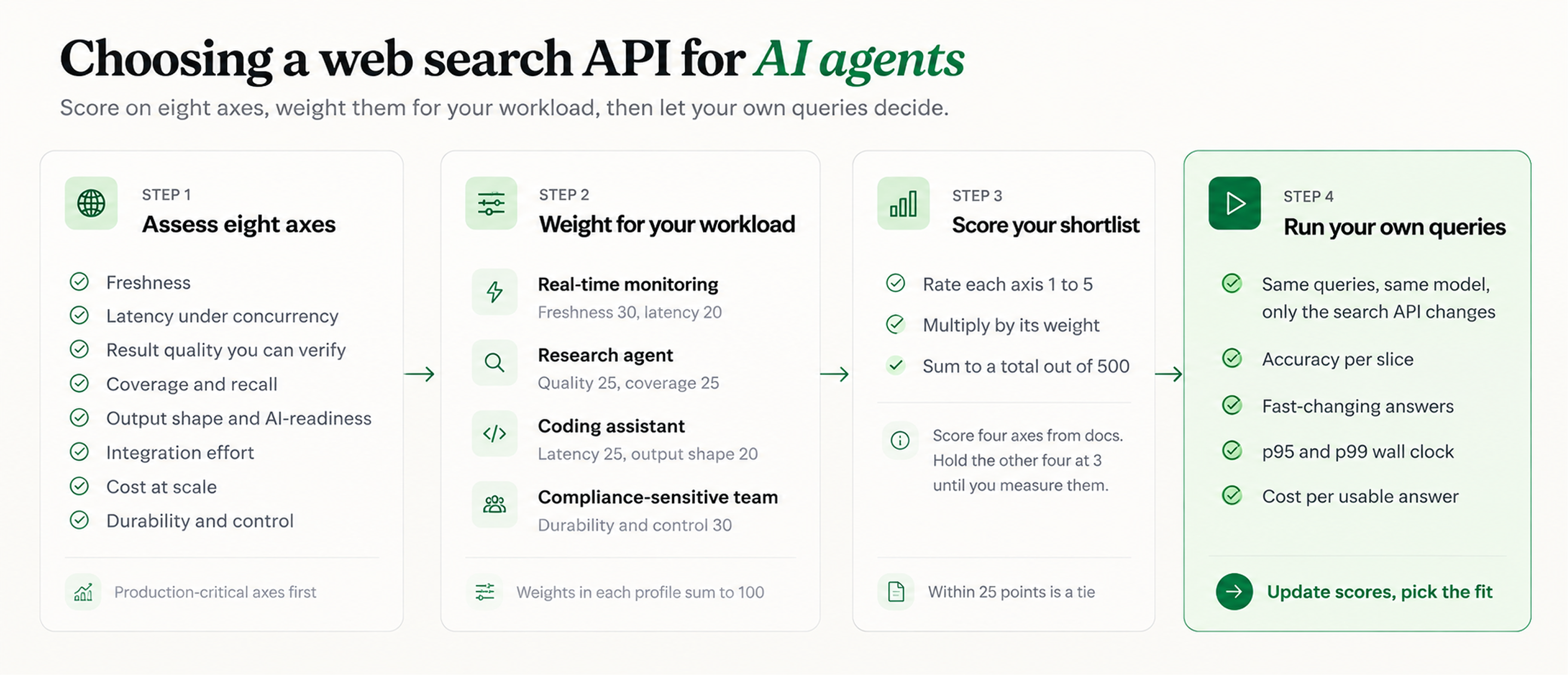
The framework scores a provider on eight axes, ordered by how directly each one decides whether your agent works in production. Freshness and latency under concurrency come first because a failure on either one breaks answers today. The remaining six decide whether the agent stays accurate, affordable, and maintainable a year from now.
Freshness
Freshness is how closely a provider's index matches the web as it stands right now, and whether each result tells you how old its copy of the page is.
Providers tend to blur two separate properties under this one word. Discovery is how fast a new page enters the index, and recrawl is how often the provider refreshes pages it already holds. Octen's FAQ says its index ingests content in seconds and updates it in minutes, and recrawl still varies by page.
The best real-time search API for AI agents gives you both a publish time and a last-crawl time per result, because those two fields answer different questions. Octen returns time_published and time_last_crawled in its search results and lets you filter by either one using time_basis. Tavily documents its time_range filter as working on the publish date or the last updated date. With a crawl timestamp in hand, your agent can decide when a result is too old and fetch the live page instead.
Score this axis on two checks. The docs should show a crawl timestamp you can filter on, and the provider should answer fast-changing questions correctly in your test. The FreshQA benchmark tags 155 of its 600 questions as fast-changing, which gives you a ready-made subset.
Latency under concurrency
Latency under concurrency is the time your agent waits on search at the request rate it runs in production, measured at the 95th and 99th percentiles (p95 and p99).
The tail matters because a parallel step waits for its slowest call. If each call has a five percent chance of landing above p95 and the calls are independent, a step that fans out 20 searches includes at least one tail call 64 percent of the time. An agent that runs five such rounds per task sees a tail call in 99.4 percent of its tasks. The median describes a single call, and the tail describes how long your user waits.
Published latency figures tend to be medians, and several of them measure time inside the provider's servers. Our documentation shows a 50th percentile (p50) as low as 62 milliseconds, measured inside the engine. Artificial Analysis measures from the agent's side by timing every web_search call its harness makes, and on that measure Octen averages 0.21 seconds per search query, the fastest measured. Per task, which adds the model's own time, Octen averages about 14 seconds, the fastest on the board, against about 26 seconds for Perplexity Search (medium) and about 30 seconds for Exa Search (auto).
Each of those numbers measures something different. The 62 milliseconds stops at the engine, while the 0.21 seconds includes everything the benchmark harness waits on. The same split shows up in your own stack, where wall-clock time adds the network and any gateway in between. Monid, an API gateway that offers Octen, saw the engine report 78 to 83 milliseconds on calls that took about one second end to end through Monid's own gateway.
You'll measure p95 and p99 wall-clock time yourself with the harness in the test section. Before that, check each provider's queries per second (QPS) limit, because a rate-limited request that retries in the background shows up as tail latency. Octen's plans for Web Search run from 10 QPS on the Free plan to 500 QPS on Max. Broad Search has its own limit of 10 QPS on Free and 20 QPS on every other plan, shared with our other search APIs and Answer.
Result quality you can verify
Result quality is how often an agent answers correctly using a provider's results, and verifiable quality means you can reproduce that number yourself.
An agent can't tell a good source from a plausible one, so weak results turn into confident, wrong answers. Quality claims from providers are hard to use until someone reproduces them, and two kinds of evidence help. The first is an independent benchmark that holds everything constant except the search API.
Artificial Analysis runs that design, with the same model, harness, and questions for every provider. In its October 19, 2026 data, Octen Search scored 77 on the Search Index, three points behind the top score of 80, against a model-only baseline of 33. It also posted the fastest per-task time of any provider, at 14.2 seconds.
The second kind of evidence is a harness you can rerun with your own query set; ask every provider on your shortlist for one. Octen publishes its evaluation framework, including the exact commands behind each published number, under an MIT license. Its mocked test suite runs without API keys.
The headline results, 95.2 percent on SimpleQA and 55.8 percent on FreshQA, compare Octen against the fast tiers of Exa, Parallel, and Tavily. We publish alongside the harness that produced them, so you can rerun both benchmarks on your own infrastructure and then point the same harness at your own queries.
A provider earns the top score with independent results plus a harness you reran. A chart you can't reproduce earns a low one.
Coverage and recall
Coverage is how much of the web a provider indexes for your domain, and recall is how many relevant results one call can return.
Enumeration tasks lean hardest on recall. When your agent has to list every vendor in a category or every release in a quarter, the result cap sets the ceiling on what one call can find. Octen's Web Search returns up to 100 results per call, and Tavily's search endpoint returns up to 20.
Fan-out raises the ceiling further. Octen's Broad Search splits a query into up to 30 sub-queries and returns results grouped by sub-query, so your agent can see which sub-query surfaced each result. When you want a flat list, one line of Python deduplicates the response from client.search.broad_search() by URL.
unique = list({r["url"]: r for group in response.search_results for r in group["results"]}.values())
Run enumeration questions from your own domain and count unique relevant URLs and source domains per answer. Add queries in every language your users write in, and confirm each provider's result cap in its API reference.
Output shape and AI-readiness
Output shape is whether results arrive as structured, model-ready text your agent can use without another fetch, and whether the provider can extract a full page when the agent needs one.
The payload a provider returns changes how much text the model reads, how often it searches again, and how much it reasons about weak results, so output shape moves your model bill along with your search bill.
On the Artificial Analysis leaderboard, Octen Search costs $9.07 per 1,000 tasks in search fees and $14.92 in model tokens, for a total of $23.99. Perplexity Search (medium) costs $62.30 in search and $8.04 in model tokens, for a total of $70.34. That puts Octen's total cost per task 66 percent lower, with search spend 85 percent lower. That's the lowest total cost per task of any provider on the leaderboard that charges for search.
Page understanding is the other half. Some pages load normally and show nothing but a login wall or a verification challenge, and an agent who reads them can conclude there is nothing to find. Octen's Extract labels each page with a page_structure such as No Main Content, so your agent can drop those pages before they reach the context window.
In your test run, measure model tokens per correct answer. From the docs, check whether you control payload size, such as Octen's highlight length (100 to 20,000 tokens) and full-content length (up to 100,000 tokens per result), and whether extraction ships in the same API.
Integration effort
Integration effort is the time from obtaining an API key to making a successful call within your agent framework, plus the work of keeping that integration up to date as the API changes.
Look for a software development kit (SDK) in your language, a Model Context Protocol (MCP) server for coding agents and desktop clients, and support for the frameworks you already run. Octen ships a Python SDK, a command-line tool, and a hosted MCP server at mcp.octen.ai, works with LangChain and LlamaIndex, and serves its docs as plain Markdown via llms.txt so a coding agent can read them.
Read each SDK's defaults as well. Octen's Python SDK retries 408, 429, 500, 502, 503, and 504 responses up to three times with exponential backoff, which keeps agents running through transient errors and means retried requests show up as added latency in your measurements.
Release cadence belongs on this axis, too. Octen's changelog shows a release every month since February 2026, so pin SDK versions and read the changelog before you upgrade. Time your first correct call inside your own framework and count the lines of glue code you wrote, and you have the score.
Cost at scale
Cost at scale is what you pay per usable, grounded answer, including search calls, content charges, and the model tokens required to read the results.
The advertised price per 1,000 calls is misleading because an autonomous agent determines how many calls to make and how much text to read. Artificial Analysis gives a clean example in its October 19, 2026 data. Parallel Search (advanced) costs more in search than Parallel Search (basic), $47.93 against $45.14 per 1,000 tasks, yet its model cost per 1,000 tasks is far lower, $11.29 against $21.65, so its search and model costs add up to $59.22 against $66.79.
Usage-based pricing needs guardrails once an agent controls the volume. Octen bills Broad Search per sub-query, so max_queries works as your budget cap. Tavily's documentation notes that its auto_parameters option can switch a search to advanced depth, which uses two credits instead of one.
As of September 30, 2026, our pricing page lists Web Search at $1 per 1,000 calls, a promotional rate discounted from $5, with full content free for the first 10 results of each search and $0.50 per 1,000 results after that. Promotional rates change, so confirm the current figures on that page before you budget.
At that rate, our list price is about one-seventh of the $7 per 1,000 requests that Exa charges for Auto Search. The same ratio shows up in measured spend. On the Artificial Analysis board, Octen's search cost is $9.07 per 1,000 tasks, against $65.57 for Exa Search (auto).
Divide the total spend in your test run, covering search, content, and model tokens, by the number of answers that passed grading. That figure is your cost per usable answer, and it directly compares across providers.
Durability and control
Durability is the likelihood that an API will still exist on the same terms next year, and control is how much of its behavior you can set.
The market has moved fast. Microsoft retired the Bing Search APIs on August 11, 2025. Google's Custom Search JSON API is closed to new customers and gives existing customers until January 1, 2027, to move. On February 10, 2026, Nebius announced an agreement to acquire Tavily. The first two events put teams on a migration deadline, and the third gave Tavily's users a new owner to evaluate.
You protect yourself in two ways. Keep a thin adapter between your agent and the provider so a swap takes a day, and favor providers that let you control sources and volume via domain allow/deny lists, result counts, time filters, and language filters. Octen accepts up to 1,200 domains per include or exclude list.
Then read the service-level agreement (SLA) for the plan you'll buy. Octen's 99.9 percent monthly uptime commitment applies to its Builder, Pro, and Max plans and excludes the Free, Base, pay-as-you-go usage, and beta features.
Weigh company age and compliance status as well. Octen is System and Organization Controls (SOC) 2 Type II certified, less than a year after founding, and our Health Insurance Portability and Accountability Act (HIPAA) compliance is in progress. Our security and compliance page also states that customer data is not used for model training. Your score comes from SLA coverage on your plan, the certifications your security team requires, ownership, and the number of days a provider swap would take.
Weight the axes for your workload
The most important factor in choosing a search API for AI agents is the axis your workload stresses hardest. Freshness leads for monitoring; verifiable quality and coverage lead for research; latency and output shape lead for coding assistants; and durability leads for regulated teams. Equal weights would favor the provider with the fewest weaknesses, which may be a different provider from the one that wins where your agent spends its time.
Pick the profile closest to your agent and adjust from there. The weights in each profile sum to 100.
Real-time monitoring agent. This agent tracks news, prices, incidents, or competitor changes and answers questions about the last hour. Its weights are freshness 30, latency under concurrency 20, cost at scale 15, coverage 10, verifiable quality 10, output shape 5, integration 5, and durability 5. Freshness leads, because a stale result is a wrong result here, and cost carries weight because monitoring reruns the same queries on a daily schedule.
Research agent. This agent answers open questions by gathering many sources and synthesizing a report. Give verifiable quality and coverage 25 each, output shape 15, cost at scale and freshness 10 each, and latency, integration, and durability 5 each. A research task runs for minutes, so a few hundred milliseconds per call barely registers, while a missed or weak source changes the conclusion.
Coding assistant. This agent pulls documentation, changelogs, and issue threads while a developer waits. Latency under concurrency 25; output shape 20; verifiable quality and integration 15 each; freshness 10; coverage, cost, and durability 5 each. The developer feels every second, and dense passages from the right docs page beat ten links the agent has to fetch.
Compliance-sensitive team. This team runs agents in finance, health, or legal work, where a change of vendor triggers a review. Durability and control take 30, verifiable quality takes 20, and integration, freshness, coverage, and output shape each take 10, with latency and cost at 5 each. Source control through domain lists, SLA coverage, and certifications decides whether a provider clears procurement at all.
Score your shortlist
Score each candidate from 1 to 5 on every axis, multiply by the axis weight, and sum the results. With weights that total 100, the maximum is 500. The table stays product-neutral so it measures fit with your workload and nothing else.
Take the weight column for your profile, or your adjusted version of it, and fill each candidate cell with the score multiplied by that weight. A candidate that scores 4 on freshness under the monitoring profile earns 4 × 30 = 120 on that row, and the weighted total is the sum of its eight rows.
| Axis | What earns a 5 | Weight (monitoring / research / coding / compliance) | Candidate A (score × weight) | Candidate B (score × weight) | Candidate C (score × weight) |
|---|---|---|---|---|---|
| Freshness | Publish and crawl timestamps on every result, filterable, and strong answers on fast-changing questions in your test | 30 / 10 / 10 / 10 | |||
| Latency under concurrency | Lowest p95 and p99 wall clock at your production rate, with QPS headroom on your plan | 20 / 5 / 25 / 5 | |||
| Result quality you can verify | Independent benchmark results plus a harness you reran on your queries | 10 / 25 / 15 / 20 | |||
| Coverage and recall | Most unique relevant URLs per enumeration answer, with result caps above your need | 10 / 25 / 5 / 10 | |||
| Output shape and AI-readiness | Fewest model tokens per correct answer, with extraction and page labels in the same API | 5 / 15 / 20 / 10 | |||
| Integration effort | SDK, MCP server, and framework support for your stack, and a first correct call in under an hour | 5 / 5 / 15 / 10 | |||
| Cost at scale | Lowest cost per usable answer in your test run | 15 / 10 / 5 / 5 | |||
| Durability and control | SLA on your plan, the certifications you need, source controls, and a one-day swap | 5 / 5 / 5 / 30 | |||
| Weighted total | Sum of the eight rows, out of 500 | 100 / 100 / 100 / 100 |
You can score coverage, output shape, integration, and durability from documentation in about an hour. Freshness, latency, quality, and cost need to be measured, so give every candidate a provisional 3 on those four and replace the scores after your test run. When two candidates finish within 25 points of each other, treat them as tied and let the test decide.
Draw candidates from the category that matches what your agent needs back from the search. The field splits into AI-native search (Octen, Exa, Tavily, Parallel, and You.com), an independent index with search engine results page (SERP) style output (Brave), SERP data from Google, Bing, and other engines (SerpAPI), search with full-page extraction (Firecrawl), recall-first event discovery (NewsCatcher CatchAll), and the search tools built into OpenAI, Anthropic, and Gemini. Perplexity Search, which scores within a point of the top of the Artificial Analysis index, also belongs on a research shortlist.
The profiles narrow that pool fast. NewsCatcher describes CatchAll jobs as asynchronous, taking 10 to 15 minutes each, which suits a monitoring pipeline but rules it out for a coding assistant. Model-native search gives up fine-grained control over sources and ranking in exchange for the simplest integration, which weighs against it on the compliance profile. Score Octen like any other candidate. Its measured speed and search cost count most on the monitoring and coding profiles. On the compliance profile, a Builder, Pro, or Max plan puts your traffic under the 99.9 percent SLA.
Run your own queries
Published benchmarks narrow the field, and your own query distribution makes the final call. Pick two or three candidates with free tiers, run the same query set through each one, holding everything else constant, and compare freshness, quality, latency, and cost for your data.
Build the query set from your agent's real traffic. Pull 100 to 200 queries from logs and tag each one by type, such as fast-changing facts, enumeration, and single lookups, so you can read results per slice. If you don't have logs yet, the FreshQA and SimpleQA sets make a reasonable stand-in. Hold the model, prompt, and result count constant across providers, which mirrors the Artificial Analysis design.
Octen's evaluation framework runs that design out of the box, and it supports Exa, Brave, Tavily, Parallel, and Perplexity as backends alongside Octen.
git clone https://github.com/Octen-Team/benchmark-for-accuracy
cd benchmark-for-accuracy
pip install -r requirements.txt
python -m pytest tests/ -q        # mocked suite, runs without API keys
cp .env.example .env              # add a key for each backend you test, plus your LLM provider
python -m scripts.load_benchmarks # builds SimpleQA and FreshQA sets from the bundled CSVs
python -m src.agent_eval --queries data/freshqa.jsonl \
    --backends octen exa-instant --k 10 --limit 100 \
    --out results/freshqa_sample --yes
python -m scripts.benchmark_report --run results/freshqa_sample
The agent_eval step passes each question through each backend, obtains a model answer from the returned results, and grades the answer using the benchmark's official grader. The report breaks down FreshQA accuracy by how quickly each answer changes, giving you a freshness score per provider. To grade your own queries, follow the README's build pipeline, which labels them, resolves gold answers, and generates grading rubrics. Those steps need a SerpAPI or Firecrawl key in addition to your LLM key.
The framework reports server-side latency. For the wall-clock tail your agent feels, run a separate measurement at your production request rate.
import os
import statistics
import sys
import time

from concurrent.futures import ThreadPoolExecutor

from octen import Octen, OctenError

MAX_QPS = 8  # launch rate; keep it under your plan's limit (the Free plan allows 10)

client = Octen(
    api_key=os.environ["OCTEN_API_KEY"],
    base_url=os.environ.get("OCTEN_API_URL", "https://api.octen.ai"),
    max_retries=0,  # count 429s and timeouts as errors instead of folding retries into p99
)


def timed_search(query):
    start = time.perf_counter()
    try:
        response = client.search.search(query=query, count=10)
    except OctenError as exc:
        return None, None, type(exc).__name__
    wall_ms = (time.perf_counter() - start) * 1000
    return wall_ms, response.latency, None


def percentile(values, p):
    return statistics.quantiles(values, n=100, method="inclusive")[p - 1]


queries = [line.strip() for line in open(sys.argv[1]) if line.strip()]

with ThreadPoolExecutor(max_workers=64) as pool:
    futures = []
    for query in queries:
        futures.append(pool.submit(timed_search, query))
        time.sleep(1 / MAX_QPS)  # fixed arrival rate, so slow responses can't throttle the test
    rows = [future.result() for future in futures]

wall = [w for w, s, err in rows if err is None]
server = [s for w, s, err in rows if err is None and s is not None]
errors = [err for w, s, err in rows if err is not None]

for label, values in (("wall clock", wall), ("server-reported", server)):
    p50, p95, p99 = (percentile(values, p) for p in (50, 95, 99))
    print(f"{label:>15}: p50 {p50:.0f} ms, p95 {p95:.0f} ms, p99 {p99:.0f} ms")

print(f"{len(errors)} of {len(queries)} requests failed: {sorted(set(errors))}")
Save the script as measure_latency.py, set OCTEN_API_KEY, and run python measure_latency.py queries.txt against a file with one query per line. The script launches requests at a fixed rate, so a slow response never delays the next request, and every slow call fully counts toward the percentiles. It also disables SDK retries, which turns rate limits into errors you can count.
The output lists p50, p95, and p99 for wall-clock and server-reported time side by side, so you can see how much of the wait comes from the engine and how much from everything around it. To test another provider, replace the body of timed_search with that provider's client call while keeping the rest unchanged.
New Octen accounts get $5 of free balance, which covers 5,000 Web Search calls at the current $1 per 1,000 rate. That leaves room to run a 200-query set through both scripts several times.
Putting it together
Score every candidate on the eight production axes, weight those axes by what your workload stresses, and verify the top two against your agent's real traffic before you sign anything. The weights keep a benchmark winner from beating the provider that fits, and the test run keeps a vendor's chart, this one included, from making the decision for you.
The provider that fits your agent is the one that wins on the axes your workload weights most, tested on your own data. To start that test with Octen as one of your candidates, create an API key and make your first request, then clone the evaluation framework and run your query set this week.