
Multimodal Search: How Retrieval Works Across Text, Images, and Video
Learn how multimodal search works across text, images, and video: shared embedding spaces, timestamped video segments, and shared vs. separate indexes.
Multimodal search lets you search and retrieve content across text, images, and video without relying only on keywords or filenames. You can type a description to find an image, pair a photo with a few words, or get results back in several formats at once.
A search for "how vector databases work" might return a written explanation, a diagram, and the exact minute of a video where someone walks through it.
Under the hood, it's all numbers. This article covers how multimodal search works, why pinning down a specific moment in a video is so much harder than finding the right file, and the decisions that end up shaping both your results and infrastructure bill.
TL;DR
-
Multimodal search uses shared embedding spaces to find related text, images, and video across formats based on meaning, rather than relying only on keywords.
-
Video search must understand what happens throughout a recording and find the exact moments that match a search query. This requires segmentation, timestamps, and additional processing.
-
Storing text, image, and video embeddings in one index makes searching across formats simpler. Separate indexes let you optimize search for each format, but combining and ranking the results is harder.
How Does Multimodal Search Work?
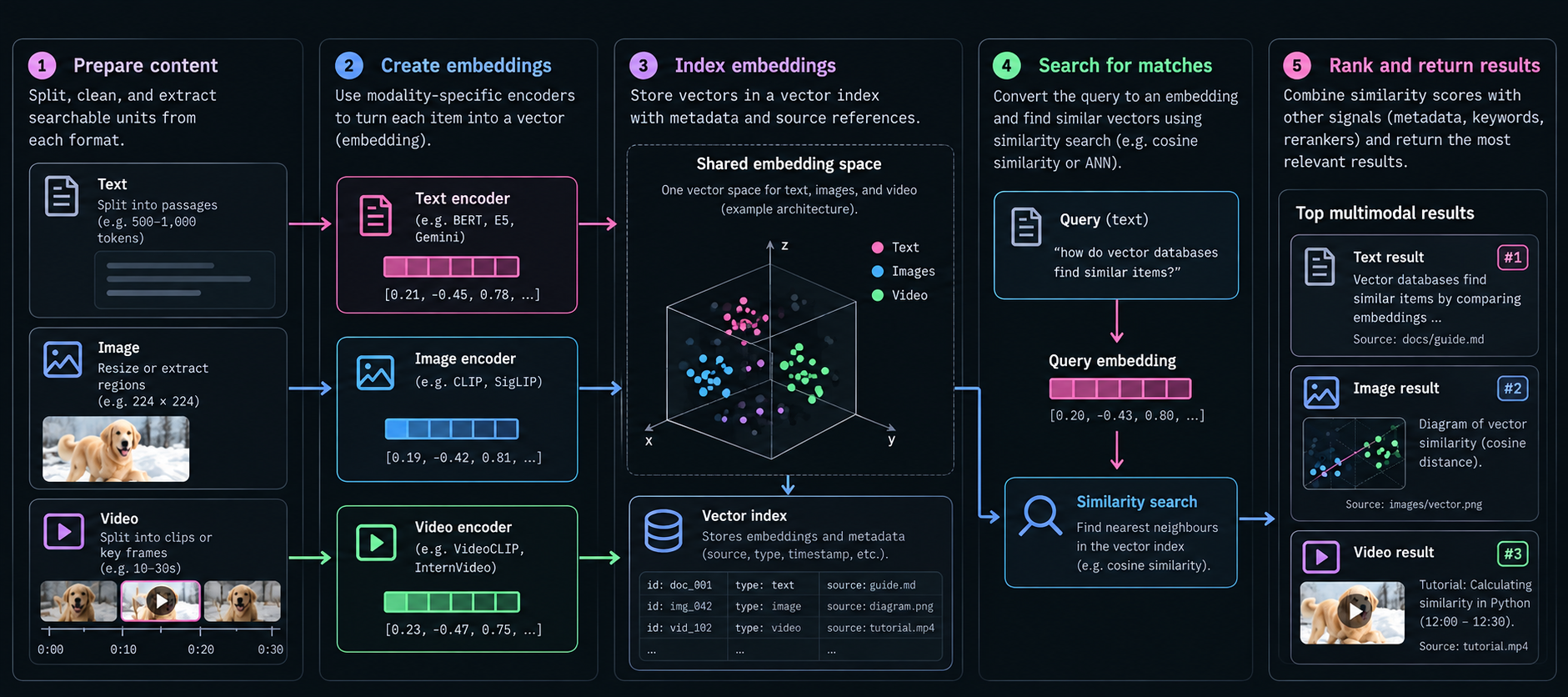
Multimodal search uses embedding models to convert text, images, and video into numerical representations called multimodal embeddings. These vectors (a list of numbers that represents information) capture features of the content, allowing the system to compare similarities across different formats.
Getting from raw content to searchable results involves five steps:
1. Prepare the Content
Before content becomes searchable, an ingest pipeline prepares the source data. It splits long documents into passages, processes images into suitable sizes or regions, and identifies relevant scenes or frames in videos.
For example, a developer blog can be split into passages by topic, while a YouTube tutorial can be divided into sections on vector similarity, Python demonstrations, and practical applications. Each segment keeps a link to its source and, for video, a timestamp. Split an article in the wrong place, though, and a code sample can lose the explanation that makes it useful.
2. Create Embeddings
A multimodal embedding model converts the prepared content into vectors, or lists of numbers that represent features learned from the input data.
A passage, diagram, and video covering vector similarity could produce embeddings like these:
text_embedding  = [0.21, -0.45, 0.78, ...]
image_embedding = [0.19, -0.42, 0.81, ...]
video_embedding = [0.23, -0.47, 0.75, ...]

#Illustrative vectors, not actual model outputs.
When trained to align these formats, the model can place related content close together in a shared embedding space. Not all embeddings are compatible, though. Systems using incompatible representations may need to search separate indexes and combine the results later.
3. Index the Embeddings
Once created, the vectors are stored in an index that organizes them for efficient similarity search, without having to compare every stored item individually.
Each vector stays linked to its original content and metadata. For example, a video segment might be indexed with:
{
  "source": "vector-search-tutorial.mp4",
  "timestamp": "12:00",
  "type": "video",
  "embedding": [0.23, -0.47, 0.75]
}
#Illustrative embedding values.
The source identifies the original file, while the timestamp points to the relevant moment. Compatible text, image, and video representations can share an index or be stored separately, depending on the retrieval architecture.
4. Search for Relevant Matches
When you search for “How do vector databases find similar items?", an embedding model converts your question into a vector. The database then compares that vector with the stored vectors to find the most similar content.
Vector search uses similarity measures such as cosine similarity or dot product to find related content. The matches might include a manual passage explaining nearest-neighbor search, a diagram illustrating vector distance, and a video demonstrating similarity calculations.
Queries can also combine formats. For example, uploading a chair photo with the words “in green” lets the system consider both its design and the preferred color. Depending on the architecture, these signals can be combined before retrieval or through separate searches.
5. Rank and Return Results
The closest matches aren't always the most relevant. A search for vector similarity might retrieve a document about database backups, even though a diagram explaining similarity calculations would be more useful.
To improve relevance, the system can consider keyword matches, metadata, and additional ranking signals. A reranking model evaluates how well each result answers the query.
The highest-ranking passages, images, or video segments are then returned with links to their original sources and timestamps where available.
How Text, Images, and Video Become Embeddings
Text, images, and video require different processing methods before they can be searched. Text models interpret words in context, image models analyze visual features, and video models also account for movement and timing.
How Text Becomes Embeddings
A search for “How do I reset an expired API key?” should surface relevant API documentation, even if the page calls the process credential rotation.
A text embedding model breaks the question into tokens, which may be words, parts of words, or punctuation.
Input:
"How do I reset an expired API key?"

Tokens (simplified):
["How", "do", "I", "reset", "an", "expired", "API", "key", "?"]
The model converts these tokens into numerical representations and uses their positions and surrounding context to interpret the question. For example, “key” could refer to a door key or an API credential, but the words "expired" and "API" clarify its meaning.
Transformer-based embedding models use attention to process these relationships, then typically combine the resulting token representations into a vector.
query_embedding = [0.18, -0.42, 0.76, ...]
The resulting representation can match documentation about replacing expired credentials or rotating API keys, even when those pages use different wording.
How Images Become Embeddings
An image encoder processes pixels to identify visual features such as objects, shapes, colors, and their relationships.
A technical blog might include a screenshot of an analytics dashboard containing a revenue chart, transaction table, and several labels. A vision transformer divides the image into patches and processes the relationships between them.
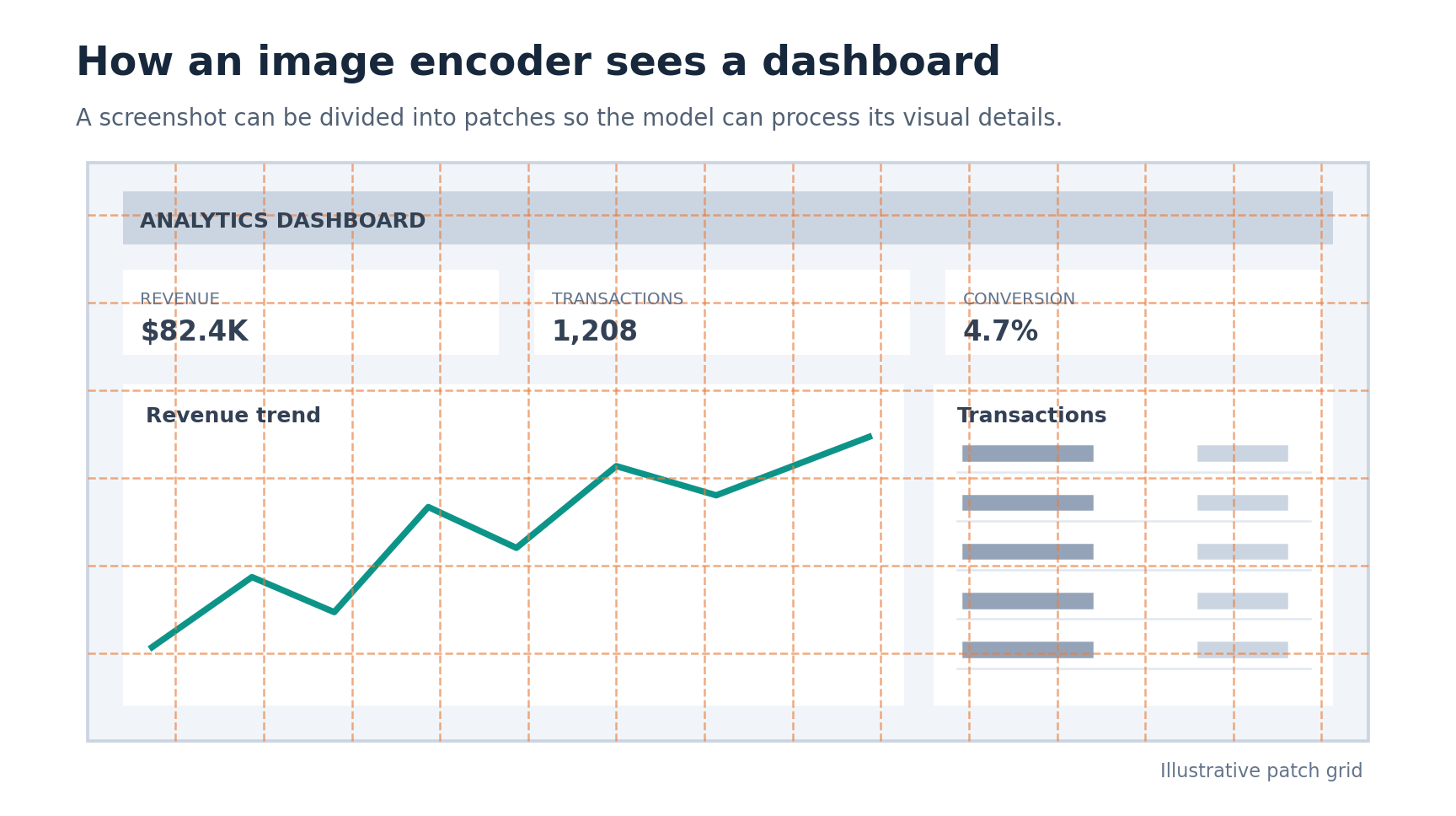
Most image embedding models combine visual features into a single vector. Some models keep multiple vectors to capture details a single embedding might miss, such as small text, numbers, or specific regions within an image.
A search for “the dashboard showing revenue growth” requires more than recognizing a dashboard. The model needs to identify the upward trend in the chart. Multiple representations can help preserve these details in complex images, including charts, tables, and diagrams.
How Video Becomes Embeddings
Video adds another challenge: understanding actions as they unfold over time.
Consider a warehouse training video on YouTube where a worker picks up a package, scans its barcode, and places it on a shelf. A single frame might show the worker holding the package, but recognizing the scanning action requires information from multiple frames.
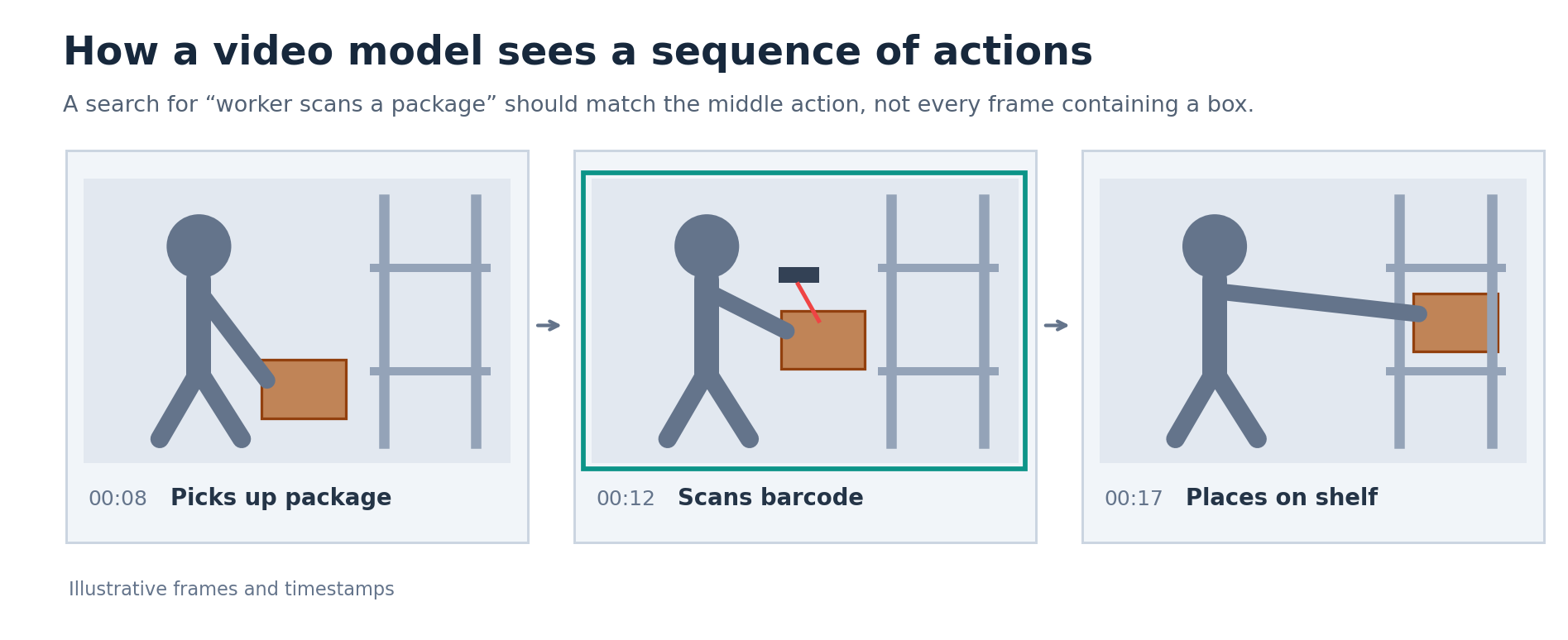
Video-aware models process frames together to capture objects, movement, and the order of actions. For retrieval, a system might index sampled frames or meaningful scenes, with timestamps linking each representation to the recording.
For example:
segments = [
    {"action": "Picking up package", "start": "00:08", "embedding": [0.31, -0.42, 0.76]},
    {"action": "Scanning barcode", "start": "00:12", "embedding": [0.65, 0.18, -0.24]},
    {"action": "Placing on shelf", "start": "00:17", "embedding": [-0.12, 0.54, 0.81]},
]
# Illustrative vectors only.
In a search for “worker scanning a package,” the system can retrieve the matching segment at 00:12 rather than returning only the full recording. Different approaches use sampled frames, scene-level representations, or multiple embeddings to capture the necessary detail.
What Is a Shared Embedding Space?
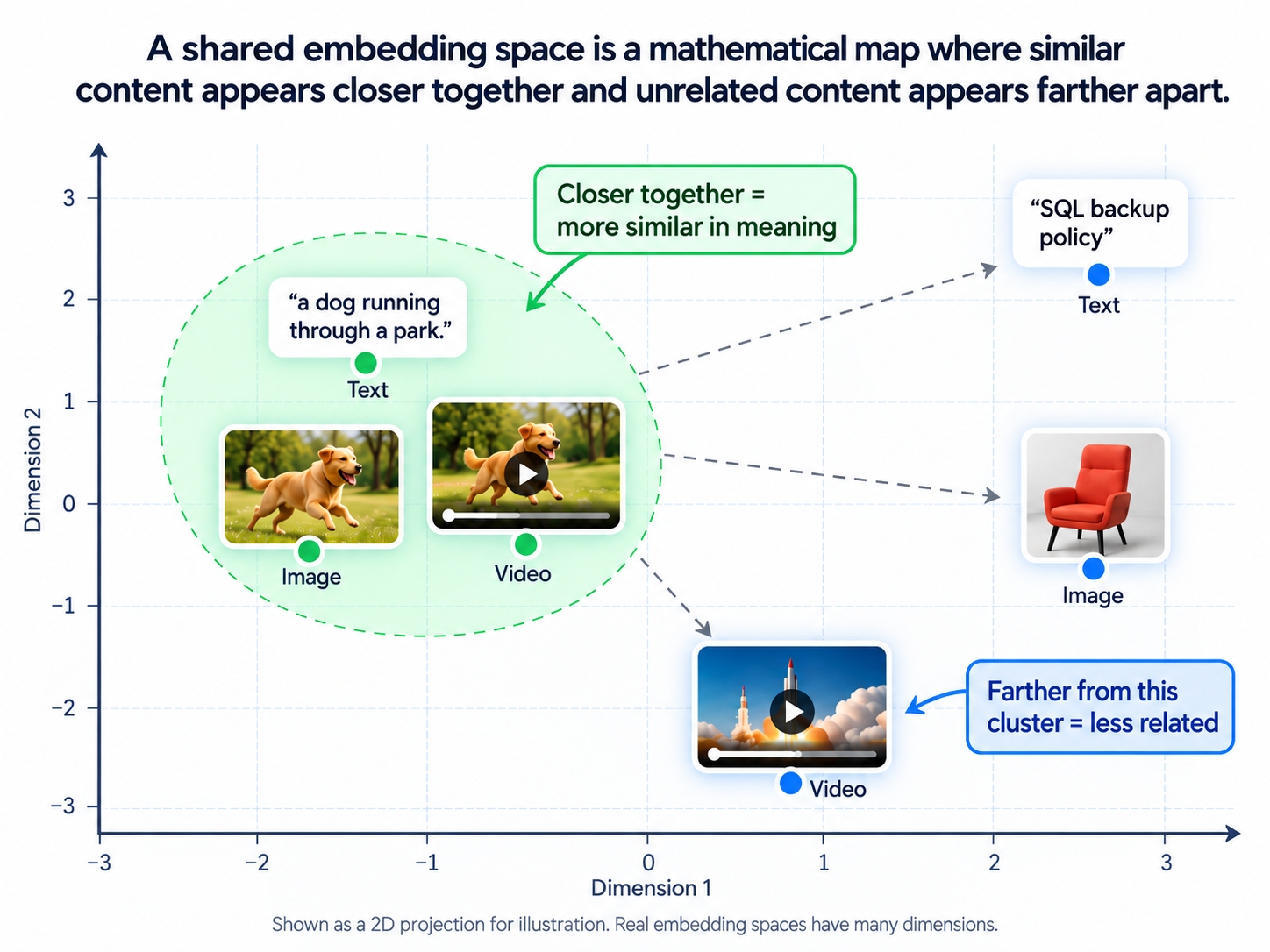
A shared embedding space is a mathematical space where multimodal embeddings represent related text, images, and video close together. This makes it possible to compare content by meaning, even when the formats differ.
A text search for “Python code calculating cosine similarity” can find a screenshot of the calculation. A model trained to align text and video can also match that description with a tutorial clip.
Models learn these relationships during training. CLIP (Contrastive Language–Image Pre-training) is a text image embedding model that uses contrastive learning to bring matching descriptions and images closer together while pushing unrelated pairs farther apart.
A multimodal embedding model trained on text and video can learn similar relationships, allowing written queries to retrieve relevant footage without relying entirely on captions or keywords.
Cross-Modal Search: Text, Image, and Video Examples
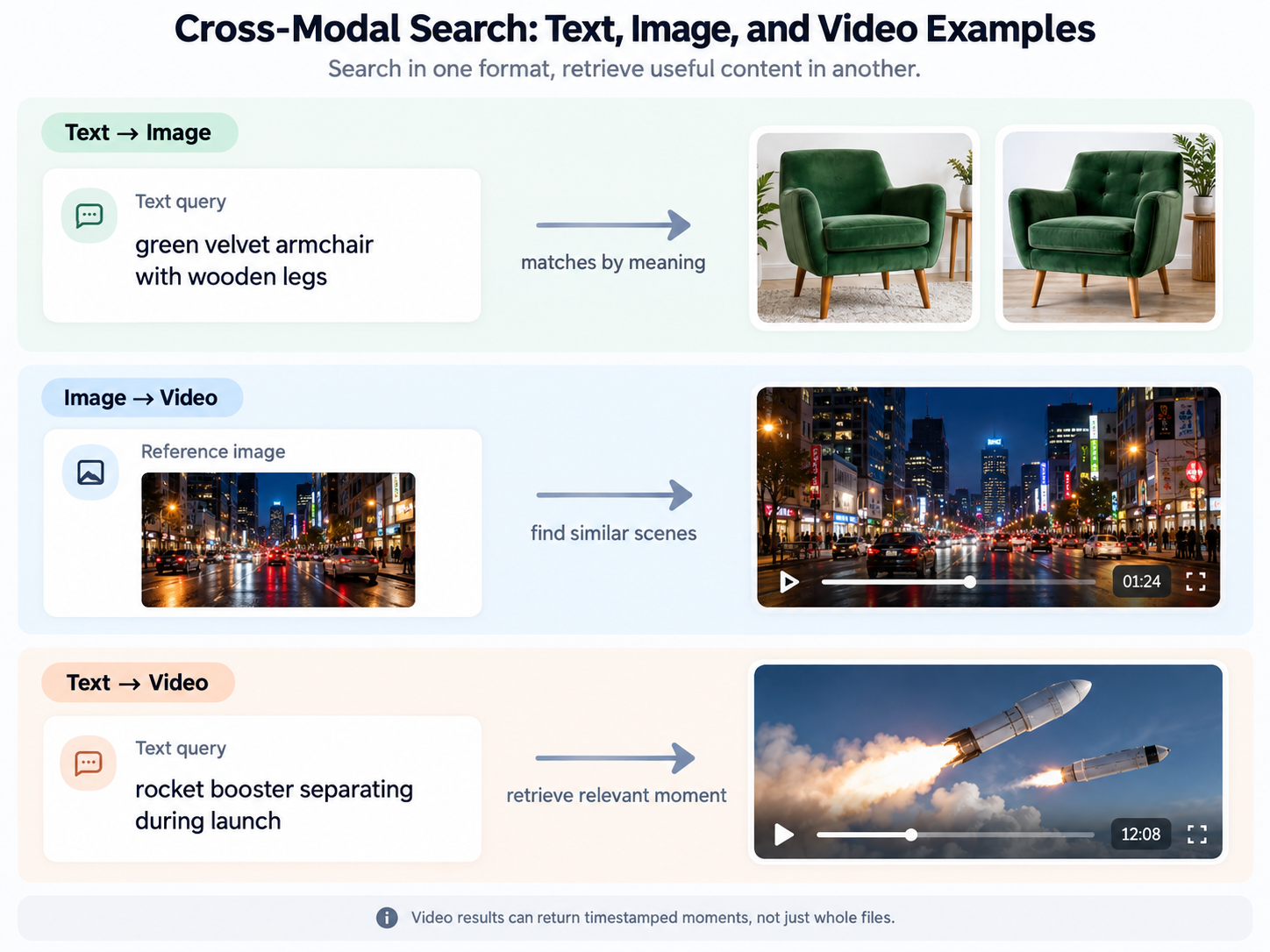
Cross-modal search lets you use one format to find content in another. Here are three common examples:
-
Text-to-image search: Search for “green velvet armchair with wooden legs” to find matching product photos, even when their captions don't contain those exact words.
-
Image-to-video search: Use a reference photo of a busy street at night to find visually similar clips online.
-
Text-to-video search: Search for “rocket booster separating during launch” to find relevant footage and, when timestamps are indexed, jump to the specific moment instead of watching the entire recording.
Why is Video Search Harder Than Text and Image Search?
Video search is harder because it must account for objects, movement, speech, and how events unfold over time. Unlike image search, finding a relevant video often means identifying a specific moment rather than an entire file.
Take a 30-minute tutorial on cosine similarity. The instructor explains the concept at minute 5, demonstrates it in Python at minute 12, and discusses applications at minute 22. Someone searching for “Python demonstration of cosine similarity” wants minute 12, not the whole recording.
A single representation might identify the right video but miss the relevant moment. To improve precision, an ingest pipeline can divide the recording into scenes or sample frames, then generate multimodal embeddings linked to timestamps.
For example:
segments = [
    {"content": "Concept explanation", "start": "05:00", "embedding": [...]},
    {"content": "Python demonstration", "start": "12:00", "embedding": [...]},
    {"content": "Practical applications", "start": "22:00", "embedding": [...]}
]
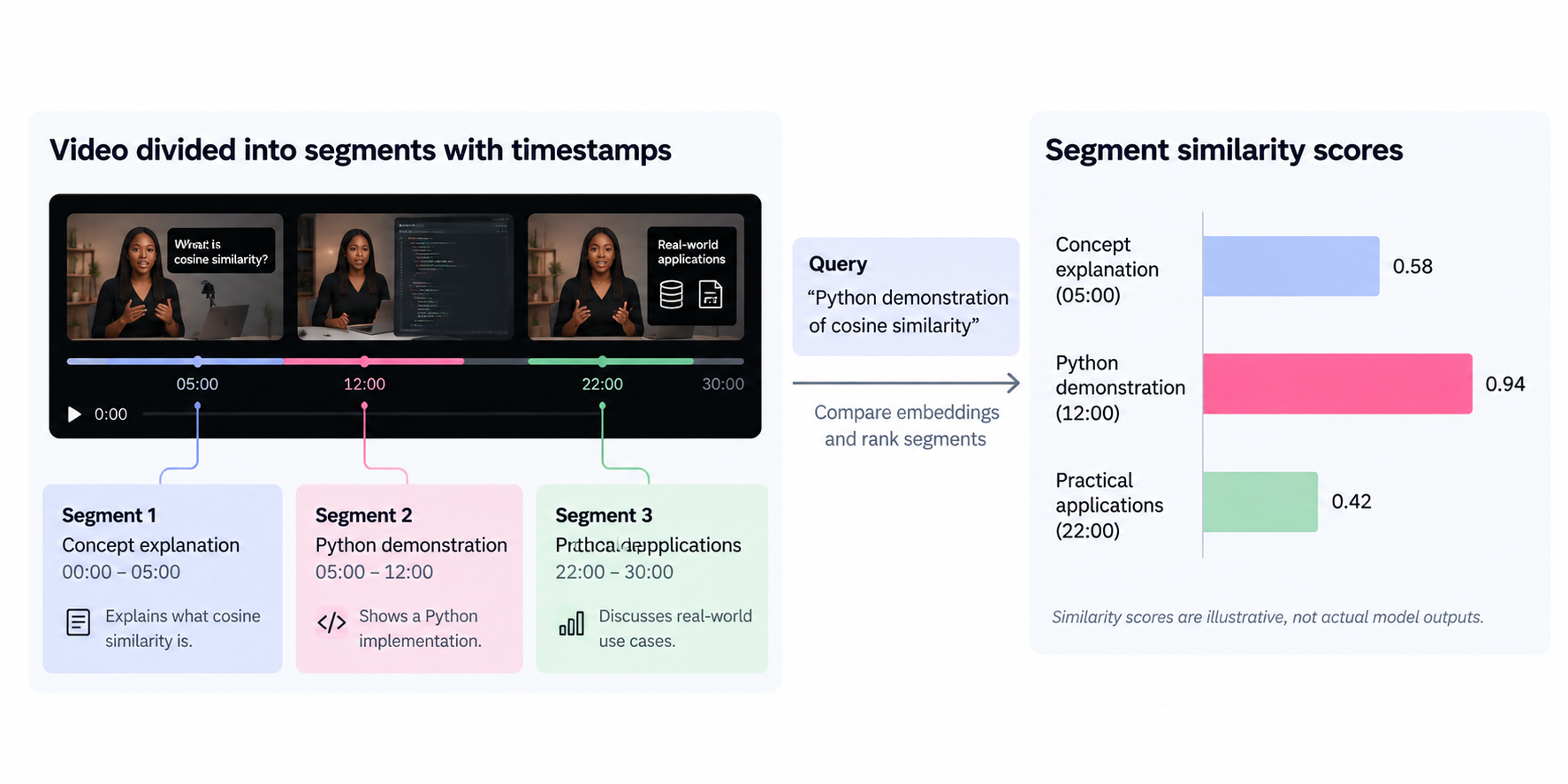
The system compares the query with the indexed segments, ranks them by similarity, and returns the Python demonstration at 12:00.
There's a tradeoff, though. Longer segments preserve context but make precise moments harder to find. Shorter ones improve precision but may lose important details. Frame sampling and segmentation also affect processing costs and the overall search experience.
Shared vs. Separate Indexes: What Are the Tradeoffs?
Multimodal search systems can store vector embeddings for text, images, and video in one shared index or separate indexes.
Shared Index: Simpler Search Across Formats
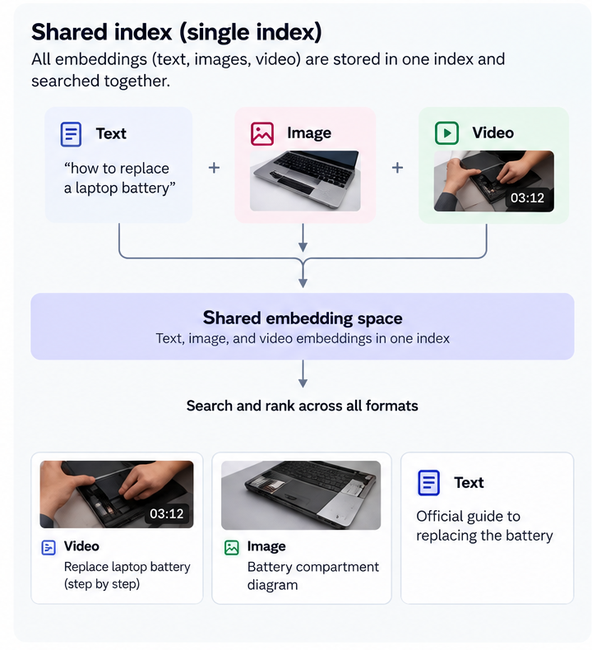
A shared index stores compatible embeddings together in one searchable collection. For example, embeddings for a product description, its photo, and a demonstration video can all sit in the same index.
A single search can retrieve and rank all three. This simplifies retrieval, but quality depends on how well the embedding model handles each format. A model might recognize product photos but struggle with technical diagrams or complex video actions. Changing the model may also require rebuilding affected embeddings.
Separate Indexes: More Control, Harder Ranking
Separate indexes store embeddings by format, allowing developers to tailor retrieval for each. A product search, for example, might use separate indexes for descriptions, photos, and demonstration videos.
The challenge is combining results. An image similarity score of 0.8 isn't necessarily equivalent to a text score of 0.8, especially when different models are used.
This is where late fusion helps. The system searches each index separately, then combines results through score normalization, rank fusion, or reranking.
Other approaches include early fusion, which combines inputs such as a product photo and the words “in black” before or during embedding creation, and intermediate fusion, which processes each input separately before combining their learned features into a joint representation.
What changes is when the system combines the information. Fusion describes how different inputs or results are brought together, not how embeddings are organized into indexes.
What Else Should You Consider?
Neither setup is automatically faster, cheaper, or more accurate. Other factors matter:
-
Model quality: Models trained on everyday photos may struggle with technical diagrams. Index tuning alone won't fix poor model understanding.
-
Exact matches: Embeddings can miss product codes, serial numbers, and names. Keyword search and metadata filters help.
-
Video costs: Processing and indexing video scenes requires more compute and storage.
The best approach depends on your content. Test retrieval quality, search speed, and processing and storage costs before deciding.
Multimodal Search vs. Multimodal RAG
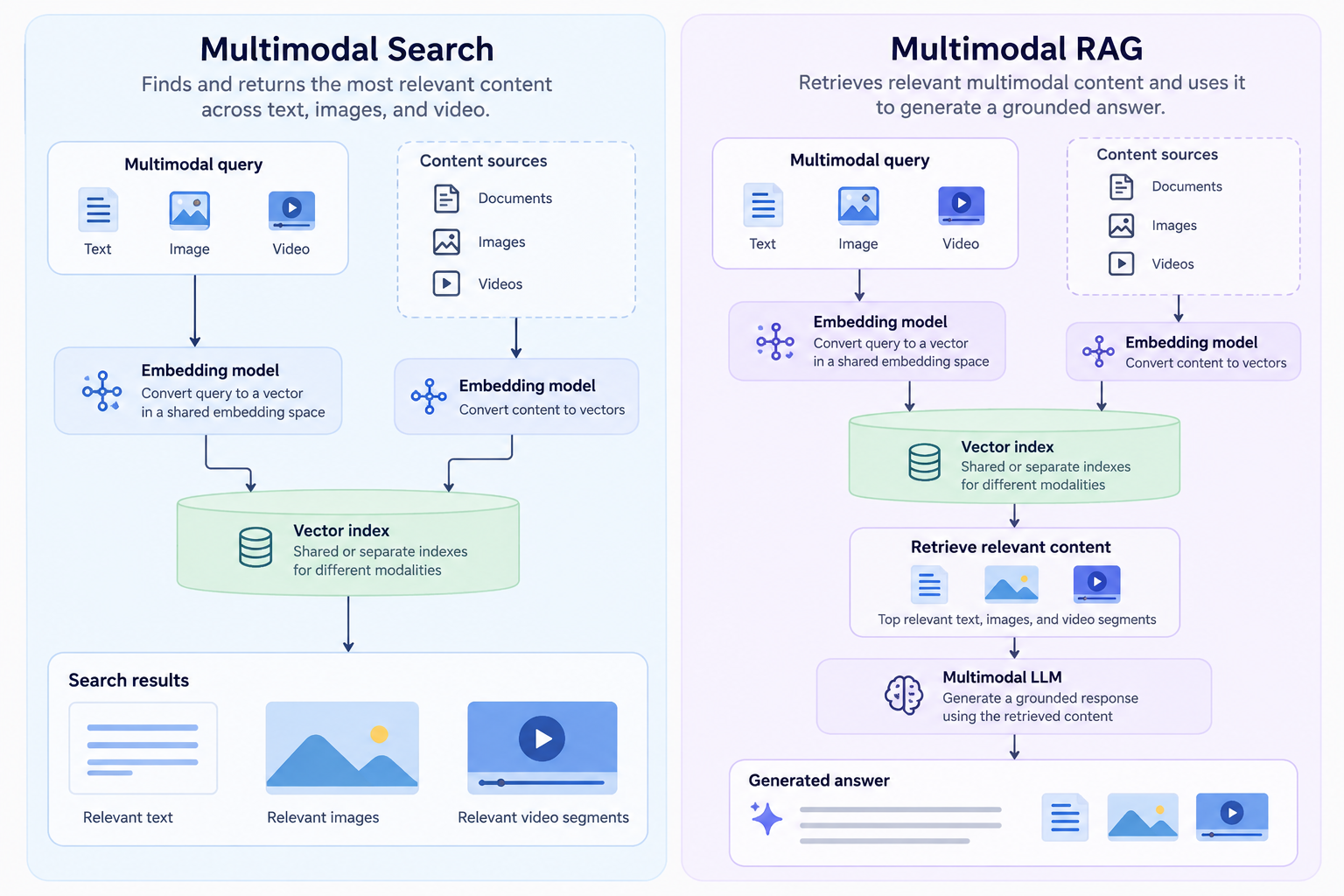
Multimodal search retrieves relevant text, images, and video. Multimodal RAG (retrieval-augmented generation) uses retrieved content to help an AI model generate an answer.
A search for “How do vector databases find similar items?” might return an explanation, a diagram, and a video tutorial for you to explore.
With multimodal RAG, the application retrieves those sources and provides them to an AI model alongside your question. For video, it might pass a transcript, selected frames, or the clip itself, depending on the model's capabilities.
The model then uses that context to explain how vector databases compare embeddings to find similar items. The application can also include source references so you can verify the answer.
As AI agents make more retrieval calls, search speed, cost, and result quality become increasingly important. We explore these challenges in Humans Search with Google. Machines Search with Octen.
Common Multimodal Architecture Use Cases
The business impact of multimodal search comes down to whether people can find what they need. A vector search might find the right tutorial but miss the relevant demonstration, or return a diagram without capturing an important label.
The tradeoff is how much preprocessing and indexing to manage yourself, especially for content already available on the web.
| Use case | Example | Retrieval architecture approach |
|---|---|---|
| Product search | A shopper uploads a chair photo and searches for a similar design in green. | Combine image similarity with text queries and product attributes such as color and category. |
| Technical documentation search | An engineer searches for an explanation of vector indexing and wants relevant articles, diagrams, and code examples. | Combine text and image retrieval, then rerank results to prioritize technical relevance. |
| Video search | Someone searches for a Python demonstration of cosine similarity instead of watching an entire tutorial. | Use video embeddings, transcripts, or timestamped segments to locate relevant content. |
| Visual troubleshooting | A user uploads a photo of a damaged laptop screen to find similar issues and repair guides. | Retrieve visually similar images and combine them with text results to find relevant explanations. |
| Research and analysis | A researcher searches for architecture diagrams or benchmark charts comparing embedding models. | Combine visual retrieval with extracted text to find specific figures, labels, and results. |
Conclusion
A useful result is not always the closest vector match. Segmentation, visual detail, and ranking all affect whether search finds the explanation, diagram, or video moment someone actually needs.
For private data, building that pipeline means processing files, generating embeddings, maintaining indexes, and enforcing access controls. Searching the live web adds crawling and freshness problems. When the content is already online, there is little reason to rebuild that search infrastructure from scratch.
Octen offers live-web search APIs instead. Image Search takes either a text query or a reference image and is available now. Video Search finds videos from text queries and is in invite-only beta; request access at support@octen.ai.
Frequently Asked Questions
What makes multimodal search expensive, and how can you reduce costs?
Costs come from processing content, generating and storing embeddings, and running searches. Video is particularly expensive because it contains many frames.
Generate embeddings when content is added and reuse them until the content or model changes. For video, adjust frame sampling and use transcripts where appropriate, but test whether these changes affect retrieval quality.
Can images be searchable using captions alone?
Yes, but caption-based search only uses the information captured in the text. A photo labeled “shirt on a hanger” might miss a search for “blue striped shirt” if those details aren't included.
Visual embeddings allow the system to search based on the image's contents. You can also combine visual embeddings with captions for broader coverage.
How do you evaluate multimodal search quality?
Test representative queries across each search direction, such as text-to-image and text-to-video. Check whether relevant results appear near the top and whether important matches are missing.
Metrics such as precision, recall, and ranking quality help measure retrieval performance. Similarity alone doesn't guarantee that a result answers the user's question.
Is a shared embedding space the same as a shared index?
No. A shared embedding space means embeddings from different formats are aligned so their similarities can be compared. A shared index is a storage and search structure that holds compatible embeddings together.
Embeddings can occupy the same mathematical space while being stored in separate indexes. The distinction is between how content is represented and how those representations are organized for retrieval.
Why can a similar search result still be the wrong answer?
Similarity identifies possible matches; it does not prove that a result satisfies the request. A passage about vector databases might discuss backups when the user wants indexing. Evaluate results against the specific task, and consider reranking candidates to assess their relevance more closely.
How do you keep a multimodal index of the public web fresh?
Web pages change, move, or disappear, so indexes need regular updates. That means detecting changes, re-crawling pages, updating embeddings, and removing broken links. This gets expensive, especially for video. For teams searching the live web, a search API removes much of that maintenance burden.