
8 Best Deep Research APIs for AI Agents in 2026
Autonomous agents stall when forced to rely on simple web links. Use our guide to pick the best deep research API for your AI workflow.
As AI research agents become more capable, the infrastructure behind them becomes increasingly important. Research agents that fan out dozens of web searches per task often stall or return thin, poorly cited results because the underlying web-fetch layer was never designed for concurrent production workloads. Once an agent fires off 20–50 queries in parallel, latency can spike, pages may reduce to SERP snippets, and the final synthesis can lack the source material needed for verification.
A deep research API is designed to handle this entire workflow and produce better results. It can autonomously plan and run multi-step web research, synthesize information across sources, and return structured, cited findings. A plain search API, by contrast, typically returns ranked links or short excerpts.
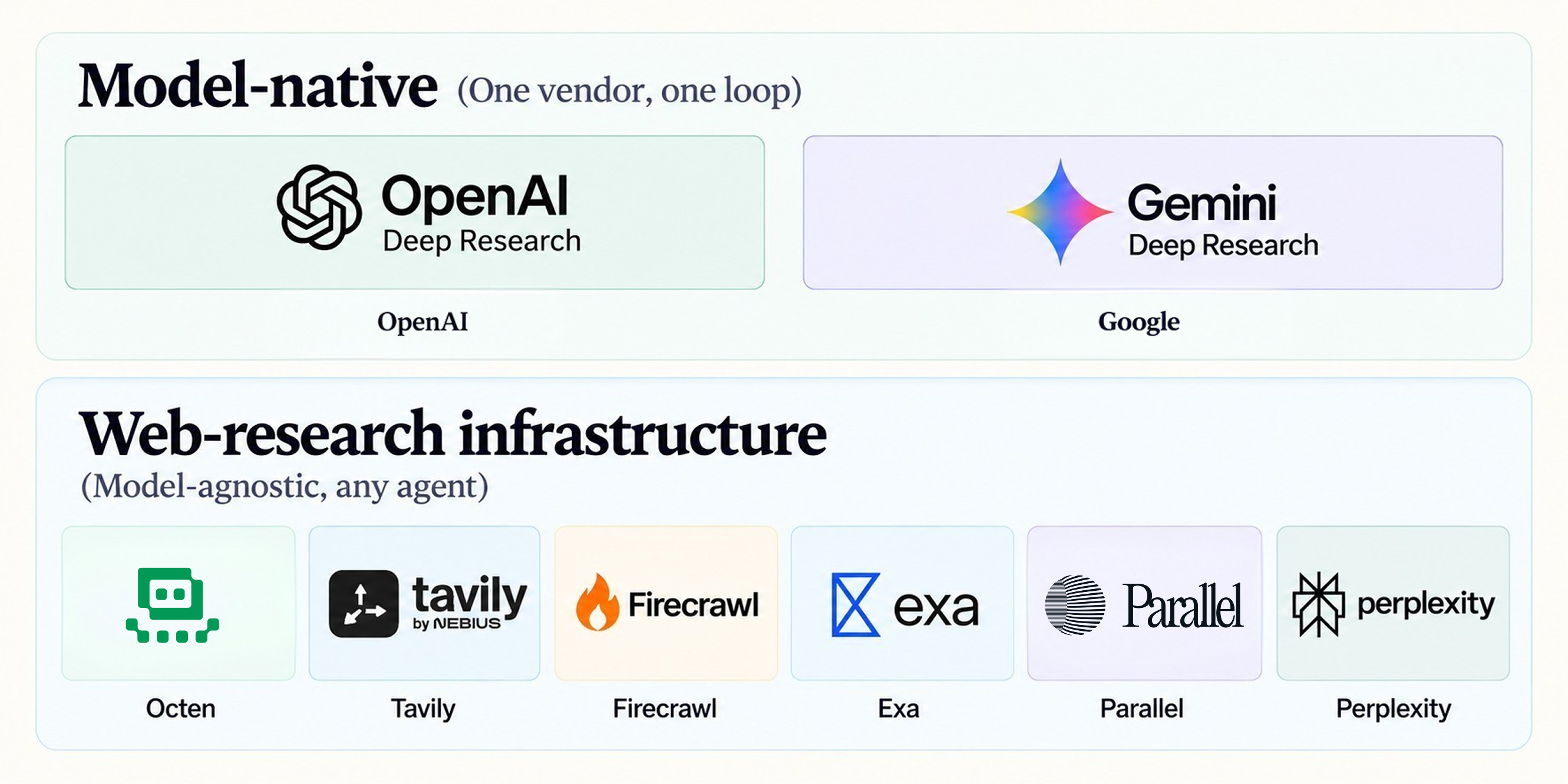
Deep research APIs fall into two categories, namely model-native and web-research infrastructure. Model-native APIs come from model providers such as OpenAI and Google, where planning, search, and synthesis run within a single vendor's ecosystem. Web-research infrastructure APIs, such as Octen, Firecrawl, Tavily, Exa, Perplexity, and Parallel, are standalone and model-agnostic. They give any developer pipeline or custom agent programmatic access to live web search, content extraction, and, in some cases, research workflows.
This guide compares the leading options across capabilities, limitations, best-fit use cases, and the factors that matter when selecting a deep research API for a given project.
TL;DR
- The best deep research API depends on what the agent needs back (a finished report, structured findings, or raw retrieval), not on one headline metric.
- Octen is strongest for cited, multimodal reports from a single call; Gemini Deep Research for end-to-end research API with little infrastructure; OpenAI for custom research loops with full control over each step; Parallel and Exa for structured output with field-level citations; Tavily for control over output and sources; and Firecrawl for building custom research loops on clean page content.
- Plan review, output format, and latency vary widely. Only Octen and Gemini Deep Research document a plan-review step, and runs range from seconds to up to 60 minutes.
- Compare cost per finished research task, not per request, since pricing ranges from flat per-run tiers to tokens, credits, and tool calls.
The best deep research APIs for AI agents
1. Octen
Octen is a real-time web search infrastructure built for AI rather than human users, giving LLMs, agents, and applications access to current information from the web. Its Deep Research application is an autonomous research agent accessed through an API. The agent first breaks the topic into a structured research plan, then searches and reads over multiple rounds, adjusting as evidence comes in. The report includes inline citations linking to the sources and can include charts, images, and videos drawn from them.
Best for
- Questions that need dozens of sources, several rounds of research, and a structured write-up rather than a page of search results.
- Developers and agents that need a finished, cited report from a single call.
- Reports that combine text with charts, images, and videos from the sources.
Key capabilities
- Autonomous planning: Breaks a complex topic into a structured research plan.
- Multi-round exploration: Searches and reads over successive rounds, adjusting as evidence comes in.
- Cited reports: Produces long-form output with inline citations linking to the sources.
- Multimodal reports: Retrieves charts, images, and videos relevant to each finding.
- Depth levels: Offers lite, standard, pro, or pro-visual options, allowing users to choose depth based on cost and time; pro-visual also illustrates each report section with source images and videos.
Cost
Octen’s deep research is billed per request by tier: Lite at $0.20, Standard at $1, Pro at $2.50, and Pro-Visual at $3.
2. OpenAI Deep Research
OpenAI supports research workflows using its flagship model (currently gpt-5.6-sol) through the Responses API. The model plans the research, performs web searches, reads sources, and produces a cited report within a single closed loop. For longer tasks, background asynchronous execution with polling or webhooks is recommended.
Best for
- Teams already standardized on OpenAI models and the wider OpenAI stack that want a research capability without adding another layer of infrastructure.
- Long-running, completeness-first investigations.
- Research that combines the public web with private data.
- Workflows that need to audit how the report was built. The API exposes the intermediate steps, including reasoning steps, web search calls, and code executions.
Key capabilities
- Multi-step agentic loops: Autonomously formulates research plans, executes consecutive web searches, downloads, reads files, and compiles reports.
- Deep data grounding: Native integration to draw simultaneously from the public internet and private data via vector stores.
- Asynchronous execution: Supports native background processing backed by webhooks or polling queues.
- Granular citations: Generates inline annotations with complete object metadata, including exact source URLs, document titles, and character span indices.
Cost
OpenAI’s current flagship model, gpt-5.6-sol, is priced at $4 per million input tokens and $20 per million output tokens, with cached input at $0.40 per million. Prompts above 272K input tokens are billed at $8 and $30 per million for input and output, applied to the full request. Because rates are listed in tokens per million, a single report’s cost depends on how many tokens the research run consumes.
Limitations
- Total per-task costs can vary wildly because the invisible reasoning tokens per run depend on the agent’s internal thought loops.
- The API does not natively pause to ask the user clarifying questions, so it requires complex, fully formed prompts from the start.
3. Perplexity Agent API
Perplexity's Agent API is a unified interface for agentic research, replacing its earlier Sonar Chat Completions, which ended support on September 27, 2026. Perplexity maps Sonar Deep Research to the high preset, built for expert-level reasoning and exhaustive source coverage, and recommends the xhigh preset for the highest-quality deep research. Within a single request, the agent can reason, call tools, observe the results, and continue. Responses return the answer along with a list of the search results used as sources.
Best for
- Teams that want a citation-backed answer from a single request, without building their own research loop.
- Demanding expert-level research that needs exhaustive source coverage, using the
highorxhighpreset. - Research workflows that also need code execution, finance or people-search data, or private tools connected through MCP.
- Teams migrating existing Sonar Deep Research usage.
Key capabilities
- Tiered presets: Five levels of fast, low, medium, high, and xhigh matched to task intensity.
- Built-in tools: Comes with web search, URL fetching, a code sandbox, and MCP servers.
- Model choice: Access to multiple model families through one API, with model fallback.
- Cited output: Answers with numbered citations and a separate list of search results.
- Background mode: Runs long jobs asynchronously.
Cost
For 1,000 short-lookup calls on the sonar model, model tokens account for $1.50 ($0.25 per million input tokens and $2.50 per million output tokens) and web search for $2.50 ($0.0025 per search). The estimate excludes URL fetching, image search, people search, finance search, and sandbox usage, and it models a short lookup rather than a multi-round research run. The final cost will be based on the actual usage reported in each API response.
Limitations
- Cost varies from request to request, since it depends on the model chosen, the tokens per request, and how many tool calls the agent makes.
- Existing Sonar integrations need migration, because Sonar Chat Completions support has ended and asynchronous Sonar requests are no longer supported.
4. Google Gemini Deep Research
Gemini Deep Research is an autonomous research agent available through the Gemini API's Interactions API. It plans, executes, and synthesizes multi-step research tasks, searching and reading iteratively before producing a detailed, cited report. It comes in two versions. Deep Research is designed for speed and efficiency, and Deep Research Max is built for maximum comprehensiveness in automated context gathering and synthesis.
Best for
- Market analysis, literature reviews, and competitive landscaping.
- Workloads that favor depth over latency and can run in the background rather than in an interactive loop.
- Research that combines the public web with a team's own data, through File Search, MCP servers, or uploaded documents and images.
- Teams that are already building on the Gemini API.
Key capabilities
- Autonomous research loop: Plans, searches, reads, and iterates before writing the report.
- Collaborative planning: Optionally returns a proposed research plan for review and refinement before execution begins.
- Built-in tooling: Google Search, URL Context, and Code Execution by default, with remote MCP servers and File Search available as additions.
- Multimodal input: Accepts images and PDFs alongside text prompts.
- Visualizations: Generates charts and graphs when the prompt asks for them.
Cost
Gemini Deep Research is billed pay-as-you-go, based on the underlying Gemini models and the tools the agent uses. Google estimates a typical Deep Research task at roughly $1–3, using about 80 search queries, 250,000 input tokens, and 60,000 output tokens. For Deep Research Max, it estimates roughly $3–7, using up to about 160 search queries, 900,000 input tokens, and 80,000 output tokens. Confirm the underlying Gemini model supports context window sizes that fit this load.
Limitations
- Structured outputs aren't supported, so the prompt steers the report format rather than a schema.
- Custom function-calling tools aren't supported, and remote MCP servers are the way to extend the agent.
- Tasks can run up to 60 minutes, which makes the service better suited to background research than interactive agent loops.
- The agent is in preview, so pricing and behavior may change.
5. Parallel
Parallel is a web-research infrastructure for AI that supports deep research in two ways. Its Task API Deep Research is asynchronous and built for comprehensive, multi-minute research on open-ended questions, optimized for the Pro and Ultra processors. Meanwhile, its Responses API is synchronous, runs in roughly 30–60 seconds at high effort, and suits simpler deep-research-style questions where a caller is waiting.
Best for
- Open-ended research that needs a citation-backed report or structured findings, without supplying data to enrich.
- Research output that downstream code consumes, with evidence attached to individual fields.
- Interactive applications that need deep-research-style answers within a latency budget.
Key capabilities
- Processor ladder: Has nine tiers with matching fast variants, so teams trade depth and latency against cost.
- Flexible output: Outputs reports in markdown, automatic structured JSON, or a custom schema.
- Field-level evidence: Citations, excerpts, reasoning, and confidence levels for each output field in structured mode.
- Follow-up questions: Chains questions with each follow-up inheriting the context of the original report.
Cost
Parallel bills per Task run by processor, not per output field. Deep Research runs on the Pro and Ultra processors, priced at $100 and $300 per 1,000 runs, which is about $0.10 and $0.30 per run.
Limitations
- Deep Research runs asynchronously and can take up to 45 minutes.
- Input should stay under 15,000 characters, because Deep Research is built for concise research prompts rather than a large context window of supplied input.
- Webhooks only signal that a task finished, so a separate call is needed to retrieve the results.
6. Firecrawl
Firecrawl is a web data platform for AI that approaches deep research by composing building blocks instead of offering one dedicated endpoint. Its Search endpoint discovers pages, and Scrape and Crawl convert them into clean Markdown or structured JSON. For autonomous research, its Agent endpoint, currently in preview, takes a natural-language prompt and researches the web on its own.
Best for
- Teams building custom deep research pipelines that want control over search, extraction, and synthesis.
- Agents whose research quality depends on clean full-page content in Markdown or schema-constrained JSON.
- Open-ended information gathering through the Agent endpoint, without writing the research loop.
Key capabilities
- Search: Discovers pages for a query, with optional scraping of the results.
- Scrape and Crawl: Convert pages into Markdown or structured JSON.
- Composable primitives: Search, Scrape, and Crawl can be combined into custom research loops.
Cost
Firecrawl uses credit-based billing, with credits per call varying by endpoint and options. Search costs two credits per 10 results, and advanced formats such as JSON cost additional credits (+4 per page). The Free plan includes 1,000 credits per month, and paid plans scale up to one million credits per month, with custom plans beyond that.
Limitations
- There is no current dedicated deep research endpoint, so developers build much of the multi-step research loop themselves unless they use the Agent endpoint.
- Firecrawl charges credits whenever it processes a request, even if the target site returns an error such as a
403or404.
7. Tavily
Tavily is a search and research API built for AI agents. Its core primitives are Search, Extract, Map, and Crawl, and its Research endpoint runs multiple searches, analyzes sources, and generates a detailed research report from a single request. Developers can choose a mini model for narrow, well-scoped questions, a pro model for comprehensive, multi-angle research, or the default auto setting.
Best for
- Teams that want a single-call research workflow alongside Tavily's search and extraction primitives.
- Research that needs controlled output, such as a JSON schema, a chosen citation style, or a set response length.
- Research that should favor or avoid specific sources, using domain preferences and blocklists.
- Research that combines the live web with a team's own documents, attached as files.
Key capabilities
- Model choice: Choose between Mini for targeted research, Pro for broad coverage, or Auto (the default).
- Output schemas: A custom JSON schema can constrain the report structure.
- Citation formats: Comes in numbered, MLA, APA, or Chicago formats.
- Domain controls: Ability to include or exclude domains.
include_domainsis a soft preference, whileexclude_domainsis a hard blocklist; each can have up to 20 entries. - File attachments: Accepts up to five
.txt,.md, or.jsonfiles per request, which the agent uses as sources and cites.
Cost
Tavily bills in credits. A research request costs a dynamic number of credits, from 4 to 110 on the mini model and from 15 to 250 on the pro model. Pay-as-you-go credits cost $0.008 each, and monthly plans lower the rate to between $0.0075 and $0.005 per credit. At the pay-as-you-go rate, the most expensive pro request costs about $2. The free plan includes 1,000 credits per month.
Limitations
- Research cost varies widely per request, so autonomous or high-volume use makes spending harder to predict.
- The
include_domainssetting is a soft preference, so sources from other domains can still appear in the report. - File attachments are limited to five text-based files and 80,000 words combined.
8. Exa
Exa is an AI search engine and web search API, and its Deep Search is the research mode of the same search endpoint. It plans searches, inspects the evidence, refines its approach when results are incomplete or contradictory, and selects the most useful results. Adding an output schema produces a synthesized answer, either as structured JSON with field-level citations or as grounded text. For long-running research, list building, and multi-hop enrichment, Exa points developers to its separate Agent API.
Best for
- Lists and structured datasets, where each requested item may need its own search.
- Research that needs grounded, structured output with field-level citations and confidence ratings.
- Teams that want retrieval and research behind a single search endpoint.
- Long-running research, list building, and enrichment, through the Agent API.
Key capabilities
- Three deep modes: Uses Deep Lite for lightweight expansion and synthesis, Deep for iterative evidence gathering, and Deep Reasoning for difficult or conflicting evidence.
- Structured output: A JSON schema returns generated values separately from field-level grounding, with citations and confidence.
- Text output: Includes grounded prose, streamed over server-sent events.
Cost
Exa is pay-as-you-go. Standard Search costs $7 per 1,000 requests with up to 10 results included. Deep Search costs $12 per 1,000 requests for Deep Lite and $15 for Deep Reasoning. Agent runs cost between $0.012 and $1.00 at fixed effort levels, while the default auto effort is metered by usage up to $5 per run.
Limitations
- Output schemas are limited to 10 properties in total and two levels of nesting, so larger datasets need split requests or the Agent API.
- Deep modes cost more than standard Search and take seconds to complete, about four seconds for Deep Lite and 12–40 seconds for Deep Reasoning.
- Agent runs on auto effort are metered by usage, which makes per-run cost harder to predict.
Comparison table
The table below gives a quick overview of the important metrics of the deep research APIs:
| API | Family | Multi-step research | Citations | Structured output | Multimodal output | Latency posture | Pricing shape | Best use case |
|---|---|---|---|---|---|---|---|---|
| Octen | Web-research | Yes | Yes (inline) | JSON, Markdown, cited report | Yes: source images, charts, and videos (Pro-Visual tier) | Async research, streaming | $0.20-$3.00 per research run, by tiers | Custom agents needing real-time search and cited research reports |
| OpenAI | Model-native | Yes | Yes (inline) | Supported | Generated charts via Code Interpreter (optional tool) | Minutes, async (background mode) | Tokens + tool-call fees | Teams already building on the OpenAI stack |
| Perplexity (Agent API) | Web-research | Yes | Yes (inline) | Supported | No in the answer; images returned separately via the image search tool | Varies by preset; background mode for long runs | Model tokens + tool-call fees | Cited answers and expert-level research inside products |
| Gemini | Model-native | Yes | Yes | Prompt-steered report | Generated charts and graphs | Minutes, async (up to 60 min) | $1-$3 per task (Deep Research); $3-$7 (Max), per Google's estimate | Background research reports with optional plan review |
| Parallel | Web-research | Yes | Yes (field-level) | JSON (auto or custom schema) or Markdown report | No | Responses API: 30-60 seconds; Task API: Asynchronous up to 45 minutes | $0.005-$2.40 per run; Deep Research available on Pro and Ultra | Structured or cited research at scale |
| Firecrawl | Web-research | Via Agent (preview) or custom loop | Yes | Markdown or JSON | No | Varies | Credits; Agent has 5 free runs/day, then dynamic pricing | Custom research pipelines needing clean extraction |
| Tavily | Web-research | Yes | Yes (numbered, MLA, APA, Chicago) | Report + JSON schema | No | Async, SSE streaming | 4-110 credits (Mini) or 15-250 credits (Pro) per request | Single-call research with output and domain control |
| Exa | Web-research | Yes (Deep modes; Agent for long runs) | Yes (field-level) | JSON schema (up to 10 properties, 2 levels) or text | No | Deep: 4 secs (Lite) to 12-40 secs (Reasoning) | $12-$15 per 1000 runs; Agent: $0.012-$1.00 | Semantic search and research requiring quality discovery |
How to choose a deep research API
Choosing the right research API dictates an agent's architecture, latency, and operational cost. The frequently asked questions around selecting a provider often come down to the specific requirements of the research workflow. Four technical factors should guide the decision.
Architectural control (orchestration versus end-to-end)
The first decision is how much of the research loop the API should handle. Model-native systems such as Gemini provide an end-to-end experience: a developer sends a prompt, and the API handles research planning, retrieval, and synthesis. This reduces infrastructure work, but also limits visibility into intermediate retrieval steps and source selection.
Infrastructure APIs such as Octen, Firecrawl, and Tavily take a different approach. They provide the retrieval layer while leaving the cognitive loop to the developer, returning structured ground truth such as ranked results and full page content rather than a pre-written answer. Octen in particular covers both ends of the spectrum, with a fully orchestrated Deep Research API that returns finished reports and raw Search and Extract primitives for building custom agent loops.
This gives teams more control to inject custom reasoning, enforce source or domain constraints, or use a specific model for synthesis.
Latency budgets and concurrency
Latency requirements depend on how the agent will be used. Interactive agents operating inside a chat or real-time interface need retrieval in milliseconds and enough concurrency to issue multiple queries without excessive queueing. Octen's Web Search, with P50 latency as low as 62 ms and high-QPS plans, is designed for this workload.
Background agents generating comprehensive reports can tolerate longer execution times, so depth and reasoning capacity matter more than retrieval speed. Model-native systems such as OpenAI Deep Research suit workflows where research can run asynchronously over several minutes.
Extraction quality and anti-bot handling
A research agent is only as good as the content it can read. Standard search APIs may return SERP snippets, but those snippets rarely provide enough context for reliable deep synthesis. The retrieval layer should be evaluated on whether it can handle JavaScript-rendered pages and common anti-bot protections such as Cloudflare and Datadome, while returning clean, LLM-ready Markdown or JSON instead of raw HTML.
Firecrawl and Octen emphasize full-page extraction for this type of workflow, giving agents access to the underlying content rather than limiting them to search-result snippets.
Unit economics at scale
Deep research can become expensive as autonomous tasks consume more searches, tokens, and reasoning steps. Model-native APIs often charge for both hidden reasoning and final output, making the cost of individual research tasks hard to predict as complexity increases. Rates quoted in tokens per million are easy to compare on paper, but translating them into per-task costs is less straightforward. Teams should therefore estimate input tokens per task before committing, accounting for the additional tokens consumed by reasoning and retrieval.
For teams running thousands of autonomous tasks, separating retrieval costs from inference costs provides more control over unit economics. A per-search or flat-rate retrieval API can make the web-research component easier to budget independently of the model used for synthesis. With Octen, web search is billed at $1 per 1,000 calls, while deep research is billed per request across four tiers, ranging from $0.20 (Lite) to $3.00 (Pro-Visual). In contrast, token-plus-search pricing models such as those used by OpenAI and Perplexity tie research costs more closely to task complexity.
Decision summary
- Choose Octen when your agent needs a finished, fully cited, multimodal research report from a single API call, with strict per-run cost caps.
- Choose Gemini for zero-infra, out-of-the-box deep research where cost and latency are secondary.
- Choose OpenAI for custom research loops with every intermediate step exposed for auditing.
- Choose Perplexity Agent API for conversational, answer-first applications that require baked-in citations.
- Choose Tavily for single-call research with control over output format and sources.
- Choose Parallel for structured research output with field-level citations.
- Choose Firecrawl to crawl or map entire websites and gather source material for research agents.
- Choose Exa for multi-step deep search that returns schema-defined JSON with citations.
Conclusion
The right research API ultimately comes down to how much control, speed, and predictability a research agent needs. Research depth, citation quality, latency, cost per task, structured output, and architectural control all shape that decision. Still, the retrieval layer remains critical to how reliably an agent performs at scale.
For teams building real-time agents that need fast, concurrent retrieval, Octen provides the underlying search infrastructure alongside a Deep Research API for end-to-end workflows. Start building faster and better research agents with Octen’s Deep Research API.