
How to Build a Web Researcher with MCP Web Search
LLMs miss recent updates without live web access. Wire MCP web search to run an autonomous researcher that extracts pages in Claude Code, Cursor, or TypeScript.
Language models mostly answer questions or respond to prompts based on their training data, so they can't reliably answer questions about recent changes without live web access. The straightforward way to give an agent that access is to wire a search API directly into it. The search integration then becomes part of the application, so you'd have to build and maintain it again for every agent you create. MCP web search separates the search capability from the application by moving it into a web search MCP server. Instead of building search into each application, you expose it as a tool through that server, and any MCP-compatible client can then discover and call that server's search tools.
By the end of this tutorial, you will have a working web researcher that can discover relevant sources, extract the pages worth reading, and return an answer with citations. We'll first connect it to Claude Code or Cursor, then build the same workflow as a small TypeScript agent using the Anthropic API. The examples use our open-source octen-mcp server, and you can find the complete implementation in the companion repo.
TL;DR
- MCP is a standard interface agents use to discover and call tools, including web search.
- The researcher you build here discovers sources, shortlists them, extracts the pages, and writes an answer whose citations point to pages it read.
- The search capability comes from a web search MCP server, which in this tutorial is Octen's open-source
octen-mcp. - You can run it in Claude Code or Cursor with one config change, or as a TypeScript agent from the companion repo.
What is a web search MCP server?
A web search MCP server is a small program that exposes web search and page reading as tools through the Model Context Protocol (MCP). An MCP client asks the server which tools it provides (tools/list), makes those tools available to the model, and forwards the model's tool calls (tools/call) to the server. Anthropic introduced MCP to address the problem that every new data source requires its own custom implementation, as web search does. Instead of building a separate search integration into every application, you can connect to one MCP server and use the same tools from Claude Code, Cursor, or a custom agent.
When MCP makes sense
MCP gives you a standardized interface for exposing tools across different clients. The model sees each tool's description and schema and can decide when to search or read a page. On the other hand, a direct search API gives you more control when a single application owns the integration, and you want to shape every request and response yourself. The two approaches can also work together, with MCP providing the interface while the server calls an API to do the work.
MCP handles the connection between the agent and the tools; the model and the underlying search service handle the research.
- The model decides which tool to call, reads the results, and writes the answer.
- The MCP client makes the server's tools available to the model, forwards tool calls to the server, and returns the results. Claude Code, Cursor, or a custom agent plays this role.
- The MCP server exposes the tools and runs them against a search service. Here, that is Octen's server; the service behind it provides search, freshness, and query fan-out.
The flow starts with the model reading the available tool descriptions and deciding which one to call and with what arguments. The client then forwards that call to the server over MCP, the server runs the tool, and returns the result to the model so it can continue the conversation. In other words, the model decides what information it needs and asks for it, and the client and server make the web requests on its behalf.
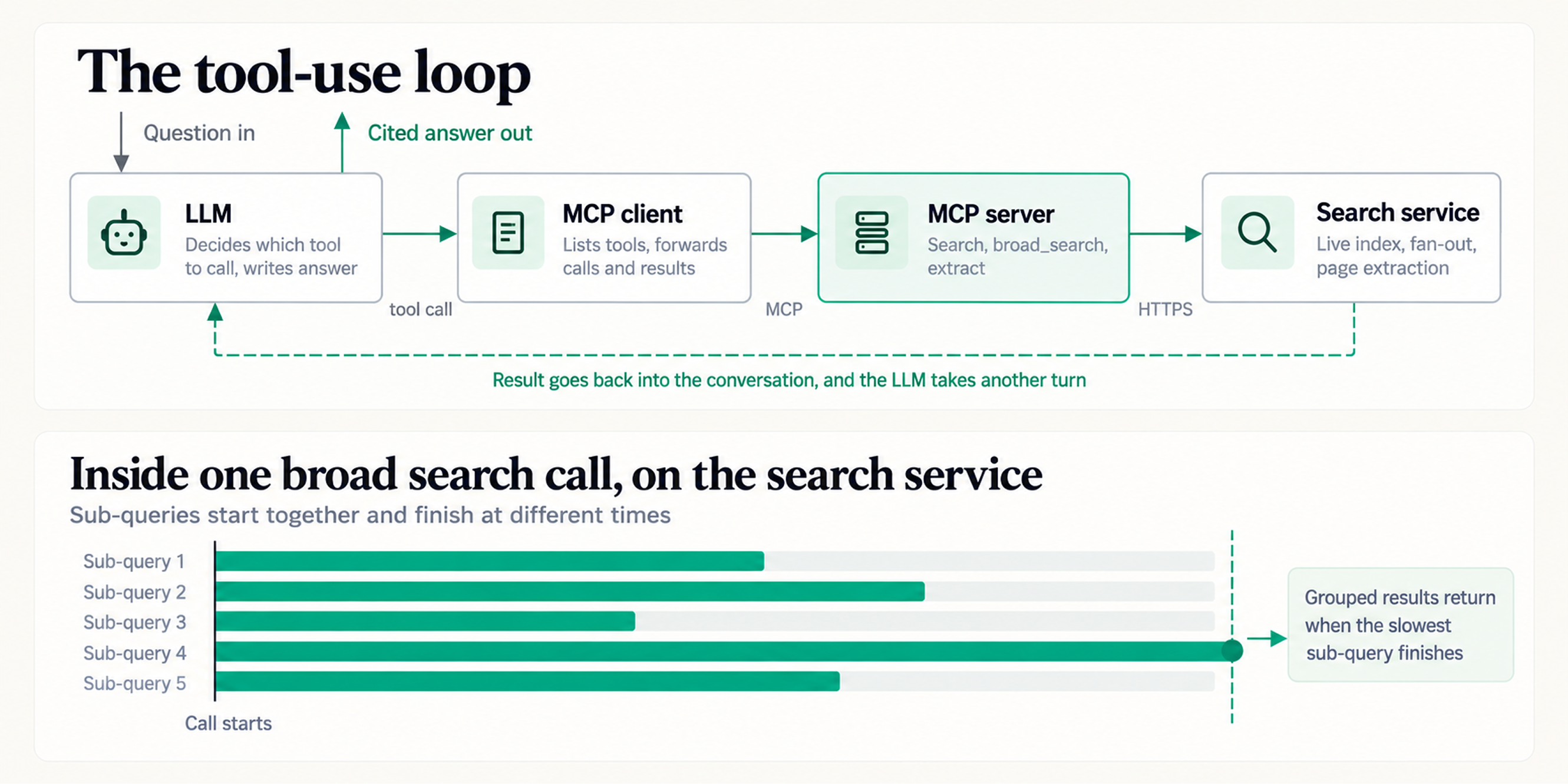
Top: the loop that repeats until the model writes its answer. Bottom: what a single broad_search call does on the search service.
Prerequisites
You need three things:
- Node.js 20 or later for the custom agent. The Claude Code and Cursor setup connects to Octen's hosted server, so it doesn't need a local runtime.
- An Octen API key: Create one on the API keys page after signing up, the quickstart walks through it. New accounts start with $5 of free balance.
- An MCP client: Claude Code or Cursor works for the first path. The custom agent also needs an Anthropic API key.
If you plan to build the custom agent, check your Node version:
node --version # needs v20 or later
Install an MCP client
Claude Code (command line): The claude mcp add command in the next section needs the Claude command-line tool. Install it with Anthropic's native installer or with Homebrew on macOS:
# macOS, Linux, WSL
curl -fsSL https://claude.ai/install.sh | bash

# or:
brew install --cask claude-code
Open a new terminal, run claude --version to verify the installation, then run claude to sign in. Claude Code requires a paid Claude plan or an Anthropic Console account.
Cursor: Download the app from cursor.com/download, install it, and open it once so it creates its settings folder. Cursor reads MCP servers from a JSON file, so it needs no extra command-line tool.
Claude desktop app: If this is the client you already have, you can use it without installing Claude Code CLI. Go to Settings → Connectors → Add custom connector, enter https://mcp.octen.ai/mcp, and sign in when Claude prompts you.
Connect Octen's MCP server
Next, register the MCP server with your client. This tutorial uses Octen's hosted server at https://mcp.octen.ai/mcp. Nothing runs on your machine, so there is no Node version to match and no environment to pass through.
If your client can only launch local servers, run npx -y octen-mcp instead. Both serve the same tools, and the README's per-client section has the local configuration for each client.
Claude Code
Run this command:
claude mcp add --transport http --scope user octen https://mcp.octen.ai/mcp --header "x-api-key: your-key-here"
Then check that it was added:
claude mcp list
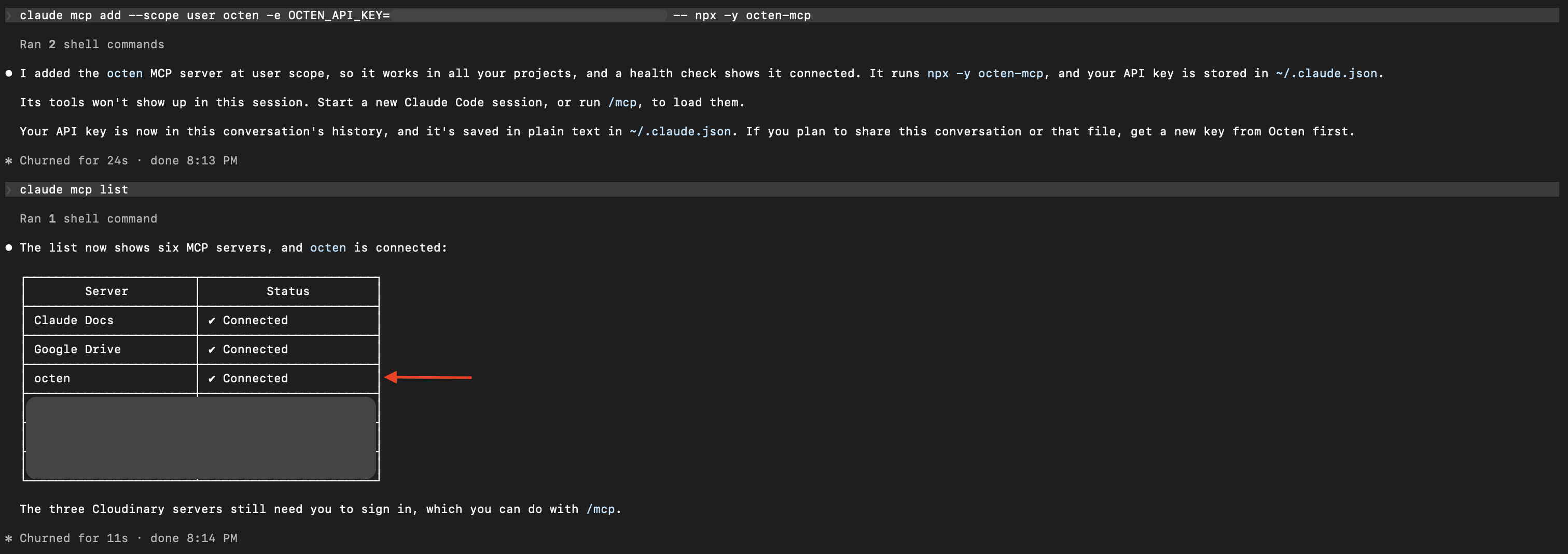
claude mcp list should show octen as connected, and /mcp inside a session shows the server and its tools.
To sign in with OAuth instead of pasting a key, install the Octen plugin. It adds the same hosted server plus two research skills:
claude plugin marketplace add Octen-Team/octen-mcp
claude plugin install octen@octen
Cursor
Add this to ~/.cursor/mcp.json and restart Cursor.
{
  "mcpServers": {
    "octen": {
      "url": "https://mcp.octen.ai/mcp",
      "headers": { "x-api-key": "your-key-here" }
    }
  }
}
The Octen server should then appear in Cursor's MCP settings with its available tools.
Other clients
Other clients take the same URL and header, but the key names differ. VS Code nests servers under servers with "type": "http", Windsurf uses serverUrl, and Gemini CLI uses httpUrl. Codex registers the server from the command line with codex mcp add octen --url https://mcp.octen.ai/mcp --header "x-api-key: your-key-here". Use the README's per-client section for each client's exact file path and format.
What the client sees and when to use each tool
Once connected, the client lists the tools below; each includes a JSON schema and a description that tells the model when to use it.
| Tool | Use it when |
|---|---|
| search | You know what you are looking for, such as one fact, one entity, or one document. |
| news_search | You need recent reporting on a single topic. |
| broad_search | The question has several angles or parts, so it needs coverage across many searches. |
| extract | You have URLs and need the contents of those pages (1 to 20 per call). |
broad_search sends one question to the Broad Search API, which breaks it into up to 30 sub-queries, runs them concurrently and returns the results grouped by sub-query. This is useful for research because the agent can explore several angles with a single tool call instead of making multiple search calls itself.
Broad Search is priced per sub-query at the same rate as a Web Search call, and each sub-query includes 10 full-content results free. If you're comparing two known things, two targeted search calls are the leaner choice, which is also what the tool description recommends.
The server also includes image_search and video_search, currently in beta. If you don't need them, add ?tools=search,news_search,broad_search,extract to the server URL so the model only sees those four. On the local server, set OCTEN_ENABLE_BETA_TOOLS=false in its env block instead. You can run npm run list-tools in the companion repo to see all available tools.
Give the agent a research task
Now that the tools are connected, give the agent a question that requires more than a single search. A good example is the latest revision of the MCP specification, since the answer involves recent changes across several parts of the spec.
What changed in the latest revision of the Model Context Protocol specification, and what do the changes mean for someone running an MCP server today?
Run it in Claude Code or Cursor
Paste this prompt into your client:
Research this with the Octen tools: What changed in the latest revision of the
Model Context Protocol specification, and what do the changes mean for someone
running an MCP server today?

Call broad_search once with the whole question, then extract the 3-6 most
authoritative sources, preferably the specification and its changelog. Cite
every claim with [n] and finish with a numbered Sources list of the pages you
extracted.
The question alone would be enough for the agent to start researching, but the prompt makes the workflow explicit: use broad_search to find relevant sources, then use extract to read the most authoritative ones. This also makes the example easier to reproduce and ensures that the citations point to pages the agent actually read.
The exact answer will vary between runs and will change as the MCP specification evolves. The example below shows the kind of answer the agent can produce.
The 2026-07-28 revision makes MCP stateless. The `initialize` handshake and
protocol-level sessions are gone, and each request now carries its protocol
version and client capabilities in `_meta` [1]. Servers must implement a new
`server/discover` method so clients can check versions and capabilities up
front [1].

For server operators, the practical changes are:

- Anything that relied on `Mcp-Session-Id` needs explicit, server-minted handles
  passed as tool arguments instead [1].
- Server-to-client notifications move to a single `subscriptions/listen`
  stream, replacing the HTTP GET endpoint and resource subscribe methods [1].
- Tasks moved out of the core protocol into an official extension, and servers
  that asked the client for input mid-request now use the Multi Round-Trip
  Requests pattern [1].
- Roots, Sampling, and Logging are deprecated with a minimum twelve-month
  window, so new servers should log to stderr or OpenTelemetry instead [1][2].

I could not find published migration numbers showing how many servers
already support the new revision.

Sources
[1] Key Changes - https://modelcontextprotocol.io/specification/2026-07-28/changelog
[2] Deprecated Features - https://modelcontextprotocol.io/specification/2026-07-28/deprecated
Build the researcher as a custom agent
Claude Code and Cursor hide the agent loop from you. Building the same researcher yourself makes that loop explicit and gives you a starting point for adding MCP web search to your own application.
The finished version is in the companion repo. The steps below build a minimal version from an empty folder using the MCP TypeScript SDK and Anthropic TypeScript SDK.
Choose one of two paths:
Run the finished code:
Clone the companion repo and skip the steps below:
git clone https://github.com/Octen-Team/octen-mcp-web-researcher
cd octen-mcp-web-researcher
npm install
cp .env.example .env    # add OCTEN_API_KEY and ANTHROPIC_API_KEY
npm run research -- --transport http "your question"
Step 1: Set up the project
Create the project and install the dependencies:
mkdir octen-web-researcher && cd octen-web-researcher
npm init -y
npm pkg set type=module
npm install @anthropic-ai/sdk @modelcontextprotocol/sdk dotenv
npm install -D typescript tsx @types/node
mkdir src
Add a tsconfig.json file:
{
  "compilerOptions": {
    "target": "ES2022",
    "module": "NodeNext",
    "moduleResolution": "NodeNext",
    "strict": true,
    "skipLibCheck": true,
    "noEmit": true
  },
  "include": ["src"]
}
Create a .env file in the project root:
OCTEN_API_KEY=your-octen-key
ANTHROPIC_API_KEY=your-anthropic-key
Note: Don't forget to add .env to .gitignore.
Step 2: Import the SDKs
Create src/researcher.ts:
import 'dotenv/config';
import Anthropic from '@anthropic-ai/sdk';
import { Client } from '@modelcontextprotocol/sdk/client/index.js';
import { StreamableHTTPClientTransport } from '@modelcontextprotocol/sdk/client/streamableHttp.js';

const MODEL = process.env.RESEARCHER_MODEL ?? 'claude-sonnet-5-5';
const RESEARCH_TOOLS = ['search', 'news_search', 'broad_search', 'extract'];
RESEARCH_TOOLS limits the MCP tools we give to Claude to the ones needed for research.
Step 3: Connect to Octen's MCP server
Create an MCP client and connect it to Octen's hosted server:
async function connect(): Promise<Client> {
  const client = new Client({
    name: 'octen-web-researcher',
    version: '1.0.0',
  });

  await client.connect(
    new StreamableHTTPClientTransport(new URL('https://mcp.octen.ai/mcp'), {
      requestInit: {
        headers: { 'x-api-key': process.env.OCTEN_API_KEY ?? '' },
      },
    })
  );

  return client;
}
StreamableHTTPClientTransport connects to the hosted server over HTTP, and the key travels as an x-api-key header. Nothing runs on your machine, and no environment variables are shared with another process.
To run the server locally instead, for example to point it at a private deployment or to debug it, add this import next to the others at the top of the file:
import { StdioClientTransport } from '@modelcontextprotocol/sdk/client/stdio.js';
Then use this version of connect() in place of the one above:
async function connect(): Promise<Client> {
  const client = new Client({
    name: 'octen-web-researcher',
    version: '1.0.0',
  });

  await client.connect(
    new StdioClientTransport({
      command: 'npx',
      args: ['-y', 'octen-mcp'],
      env: {
        OCTEN_API_KEY: process.env.OCTEN_API_KEY ?? '',
        OCTEN_ENABLE_BETA_TOOLS: 'false',
      },
    })
  );

  return client;
}
StdioClientTransport starts npx -y octen-mcp as a child process and communicates with it over stdin and stdout. The env block passes the server only what it needs: your Octen key and the beta-tools setting. The SDK adds a small set of safe defaults such as HOME and PATH, which is enough for npx to run, and keeps everything else in your environment, including ANTHROPIC_API_KEY, out of the child process. If your network requires a proxy, add HTTPS_PROXY (and NODE_EXTRA_CA_CERTS for a custom certificate authority) to the same block.
Step 4: Give Claude the MCP tools
Ask the MCP server for its tools:
async function loadTools(client: Client): Promise<Anthropic.Tool[]> {
  const { tools } = await client.listTools();

  return tools
    .filter((tool) => RESEARCH_TOOLS.includes(tool.name))
    .map((tool) => ({
      name: tool.name,
      description: tool.description ?? '',
      input_schema: tool.inputSchema as Anthropic.Tool.InputSchema,
    }));
}
client.listTools() sends an MCP tools/list request to the Octen MCP server. Each tool comes with a name, description, and input schema. We pass those directly to Claude as its available tools.
This also means Claude receives Octen's own descriptions and guidance for each tool, so you write none of them yourself.
Step 5: Call an MCP tool
When Claude requests a tool, send the request to Octen:
async function callTool(client: Client, name: string, args: Record<string, unknown>) {
  const result = await client.callTool({
    name,
    arguments: args,
  });

  const content = (result.content ?? []) as Array<{
    type: string;
    text?: string;
  }>;

  const text = content
    .filter((content) => content.type === 'text')
    .map((content) => content.text)
    .join('\n');

  return {
    text,
    isError: Boolean(result.isError),
  };
}
The important part is client.callTool(). It sends the model's tool call to the MCP server and returns the server's response.
Step 6: Tell Claude how to research
Now give the model instructions for how to use the tools:
const SYSTEM_PROMPT = (today: string) => `You are a web researcher. Today's date is ${today}.

You have live web tools served over MCP. Work in this order:
1. Call broad_search ONCE with the whole question. Do not pre-split it.
2. Pick the 3-6 most authoritative URLs from the results. Prefer primary sources.
3. Call extract on those URLs in a single call so you read the pages themselves.
4. If a specific gap remains, use one targeted search or extract.
5. Answer with [n] citations that map to pages you actually extracted. End with a
Sources list containing the title and URL for each source. Say plainly what you
could not establish.`;
The date gives the model a reference point for questions involving terms such as "latest" or "this week."
Step 7: Build the agent loop
This is where everything comes together. Claude either returns a normal answer or asks to use a tool. When it asks for a tool, we call it through MCP, return the result to Claude, and let it continue.
async function research(question: string, maxTurns = 8): Promise<string> {
  const llm = new Anthropic();
  const client = await connect();

  try {
    const tools = await loadTools(client);
    const messages: Anthropic.MessageParam[] = [{ role: 'user', content: question }];

    const system = SYSTEM_PROMPT(new Date().toISOString().slice(0, 10));

    for (let turn = 1; turn <= maxTurns; turn++) {
      const response = await llm.messages.create({
        model: MODEL,
        max_tokens: 8000,
        system,
        tools,
        messages,
      });

      messages.push({
        role: 'assistant',
        content: response.content,
      });

      const toolUses = response.content.filter(
        (block): block is Anthropic.ToolUseBlock => block.type === 'tool_use'
      );

      if (toolUses.length === 0) {
        return response.content
          .filter((block): block is Anthropic.TextBlock => block.type === 'text')
          .map((block) => block.text)
          .join('');
      }

      const results: Anthropic.ToolResultBlockParam[] = [];

      for (const block of toolUses) {
        console.error(`[turn ${turn}] -> ${block.name} ${JSON.stringify(block.input)}`);

        const { text, isError } = await callTool(
          client,
          block.name,
          block.input as Record<string, unknown>
        );

        results.push({
          type: 'tool_result',
          tool_use_id: block.id,
          content: text,
          is_error: isError,
        });
      }

      messages.push({
        role: 'user',
        content: results,
      });
    }

    return `Stopped after ${maxTurns} turns without a final answer.`;
  } finally {
    await client.close();
  }
}
There are three important pieces here:
- Claude requests a tool. The response contains a
tool_useblock. - Your code executes it through MCP. The result is returned as a
tool_result. - Claude gets another turn. It can use the result to decide what to do next.
maxTurns puts a limit on the loop so the agent doesn't keep making calls indefinitely.
Step 8: Run the researcher
Finally, read the question from the command line:
const question = process.argv.slice(2).join(' ').trim();

if (!question) {
  console.error('Usage: npx tsx src/researcher.ts "your question"');
  process.exit(1);
}

console.log(await research(question));
Run it:
npx tsx src/researcher.ts "What changed in the latest revision of the Model Context Protocol specification, and what does it mean for someone running an MCP server today?"
You'll see the tool calls as they happen, followed by the researcher's final answer.
You can also redirect the output to a file:
npx tsx src/researcher.ts "your question" > answer.md
The companion repo goes a little further with a trace printer, local-server support, and a tool-listing command. The important part, though, is the loop you just built where Claude decides what to call, your application sends the call through MCP, and the result goes back to Claude for the next step.
Verify and understand what happened
The trace follows four research stages, and each stage has a different job.
- Discover (Octen's Broad Search): The model called
broad_searchonce with the entire question. Octen's Broad Search API split it into sub-queries, ran them concurrently, and returned the results grouped by sub-query. This gives the agent the results of several searches in one tool call instead of making multiple sequentialsearchcalls. - Shortlist (the model): Because the results aren't deduplicated, the same URL can appear under several sub-queries. The model removes duplicates and selects the most authoritative sources, which in this case are the MCP specification's changelog and deprecation registry.
- Extract (Octen's Extract): The model sends those URLs to
extract, which returns the page content as markdown along withpage_structureandcategorymetadata. The agent can skip pages markedNo Main Content, such as login walls or empty shells. Here,extractis called without aquery, so it returns the page body. Supplying aqueryinstead returns relevant highlights, which is more useful when looking for a specific fact. - Synthesize and cite (the model): The model builds its answer from the pages it actually extracted, and each
[n]citation points to one of those pages. That creates a simple chain: search → shortlist → extract → answer → citation. This is stronger than citing search results directly because the model has actually read the pages behind its claims.
The MCP connects these pieces by carrying the tool definitions, calls, and results between the agent and Octen's server. The search service provides freshness, and Broad Search provides concurrent fan-out.
What does it cost?
Web Search and Broad Search share one billing unit, the Search API call. A broad_search gives you the coverage of several searches in a single tool call, and each of those searches counts as one Search API call. Every response reports exactly how many ran in num_search_queries, so you can see what each request costs and tune it with max_queries.
As of October 2026, the pricing page lists Search API calls at a promotional $1 per 1,000 calls (80% off a $5 list price) and Extract at $1 per 1,000 successful URLs. Promotional pricing can change, so check the current pricing before estimating costs.
Troubleshooting
Most problems happen between the client and MCP server, before a search is even made.
Every call fails on Node 26+ (local server)
Cause: octen-mcp 0.4.1 and earlier can fail on Node 26+ with Network error … code=UND_ERR_INVALID_ARG.
Fix: Use the latest version:
npx -y octen-mcp@latest
Or pin version 0.4.2 or later. See the octen-mcp quick start.
OCTEN_API_KEY env var is not set (local server)
Cause: MCP clients start servers with a limited environment. A key exported in your shell isn't necessarily available to the MCP server.
Fix: Pass the key through the server's env configuration, or use -e with Claude Code. If you're building your own client, set OCTEN_API_KEY in the env block of StdioClientTransport, as Step 3 does, and add only the other variables the server needs.
The MCP server or tools don't appear
Cause: The client may not have restarted after the MCP configuration changed, or the configuration may have invalid JSON or the wrong key for the server URL.
Fix:
- Restart the client after changing the MCP configuration.
- Check the configuration for JSON errors.
- Check which key your client expects for a remote server:
url,serverUrl, orhttpUrl. - On the local server, make sure
npxis available to the client. If you use a version manager such asnvm, try the absolute path tonpx.
The agent answers without using the tools
Cause: The model may decide it can answer without searching, or the MCP tools may be loaded only when needed.
Fix: Explicitly tell the model which tools to use, as we did in the research prompt. In Claude Code, you can also configure the server to always load its tools with "alwaysLoad": true in .mcp.json (v2.1.121+). The trade-off is that the tool schemas consume context on every turn.
401 from the hosted server
Cause: The API key isn't reaching the hosted MCP endpoint.
Fix: Send it as an x-api-key header:
x-api-key: your-key
The octen-mcp README also documents the Authorization: Bearer <key> form for clients that only support authorization headers.
Most current clients, including Zed, Warp, Raycast, and Cline, connect to remote servers by URL and send the key as a header, so they can use the hosted endpoint directly. A client, or an older client version, that can only launch local servers over stdio can reach the hosted endpoint through mcp-remote, a small npm package that runs locally as a stdio server and forwards each request to the remote URL. It takes the key through a --header flag and splits the value at the first colon, so write the header with no space after the colon:
{
  "mcpServers": {
    "octen": {
      "command": "npx",
      "args": [
        "-y",
        "mcp-remote",
        "https://mcp.octen.ai/mcp",
        "--header",
        "x-api-key:your-key-here"
      ]
    }
  }
}
429 responses
Cause: You've hit a rate limit. Web Search has its own QPS limit set by your tier, from 10 on Free up to 500 on Max. Broad Search and News Search share a separate QPS limit with Octen's other search APIs: 10 on Free and 20 on every paid tier. Extract is limited by URLs per minute, depending on the mode: 2,000 for standard, 500 for auto, and 200 for advanced. See Octen's rate limits for the full table.
Fix: Reduce max_queries, space out requests, or wait for the rate-limit window to reset. A single research run usually won't hit these limits, but multiple agents sharing the same key can.
Results are empty or too thin
Cause: Your filters may be too restrictive, for example, a narrow time window, strict include_text filter, or short include_domains list.
Fix: Loosen the filters first. If Broad Search still leaves a specific gap, close it with a targeted search call, which costs less and returns more focused results than repeating the same broad query.
What's next
Now try a question of your own, run it through Claude Code, Cursor, or the companion repo, read the tool calls alongside the answer, and check that every citation points to a page the agent actually extracted. Once that check holds for your questions, you have a foundation for a more capable research agent.
From here, you can:
- Build a full deep research agent with planning, coverage checks, and subagents that each research one branch of a large question. See our comparison of deep research APIs.
- Compare search providers with our search API comparison and our open-source evaluation harness, which runs the same queries against several providers so you can check the results yourself.
For this research workflow, Octen provides three capabilities that map onto the stages above. broad_search breaks complex questions into concurrent searches, extract lets the model read and label the pages behind its citations, and the index takes minute-level updates for questions about recent changes.
These are Octen capabilities that sit behind the standard MCP interface, so your agent gets them without any custom integration code. The octen-mcp server is open source, so you can read exactly what each tool sends, and the changelog shows how quickly it is growing, with the hosted MCP endpoint, OAuth sign-in, and the News Search API all shipped in the last few months.
Create an Octen API key at octen.ai/platform/api-keys, clone the companion repo, and run your first research question.