
Real-Time Indexing: Why Five Minutes Changes What Your Agent Can Answer
A delayed search index guarantees stale AI answers. Equip your autonomous agents with a real time web search API to capture live web updates in minutes.
Your agent gets asked whether the central bank changed its policy rate today. It searches, cites a source, and confidently answers with last month's rate, because the decision was published an hour ago and the index has not captured it yet. Teams building real-time data access for LLM applications plug in a real-time web search API for exactly this reason. Whether that search keeps answers current comes down to one thing that rarely appears in comparisons: the crawl-to-searchable window, how long it takes a new or updated page to become searchable.
The training cutoff usually gets the blame for stale answers, and most teams already plan around it by adding search. Stale answers come from the search layer, since the model searched an index that still held the old page. That makes the crawl-to-searchable window more than a technical detail.
The crawl-to-searchable window defines how recently your agent can know something through search. If a page changed an hour ago but your search index has not picked up the change, the agent cannot retrieve that new information, no matter how capable the model is.
In this article, we'll show how Octen indexes pages within about five minutes of their publication, and every result includes timestamps so you can verify freshness yourself. We'll also use an open-source probe to test this window against pages you select.
TL;DR
-
Real-time indexing is how quickly a published or changed page becomes searchable; we call this the crawl-to-searchable window.
-
That window sets the earliest moment your agent's search layer can return a new page. Ranking and the model still decide whether the agent uses it.
-
Octen indexes pages within five minutes of publication, with our index ingesting in seconds and updating in minutes.
-
Every result carries
time_publishedandtime_last_crawled, so you can inspect freshness on each result yourself. -
The freshness probe lets you measure the window on a page you control, using a free account.
What real-time indexing actually means
In the earlier example, the page changed an hour before the agent searched, and the index still held last week's copy. Real-time indexing is about how short that delay can be, measured as the time between a page being published or updated and a query being able to return it. We call that time the crawl-to-searchable window, because the crawler has to find the page, fetch it, parse it, and write it to the index before any query can reach it.
We use "real-time" to mean the index updates continuously as pages are crawled, so a new or changed page can be searchable within minutes. A scheduled index refresh works differently, since changes wait for the next run.
What is web freshness?
Web freshness describes how closely a search index matches the live web. It has two parts that answer different questions.
-
Index freshness: Answers "Has the search engine captured the new page yet?"
-
Result freshness: Answers "Did my particular query actually return that new page?"
Index freshness comes first, and result freshness also depends on ranking and on whether the query is specific enough to reach the page. A page can sit in the index within minutes and still lose to an older, more authoritative page in the ranking.
Web search was built for people, and a periodically refreshed index served them well enough. A person sees the date on a result and opens the source when it looks old. An agent takes results as given unless you build that check in, and its questions are often about what is true right now, which is why the window matters more for agents than it did for human search. Our Web Search docs put the premise this way: "For an LLM or agent, search is the bridge to everything that happened after training: the live web, today's facts, the newest sources."
The answerable-question boundary
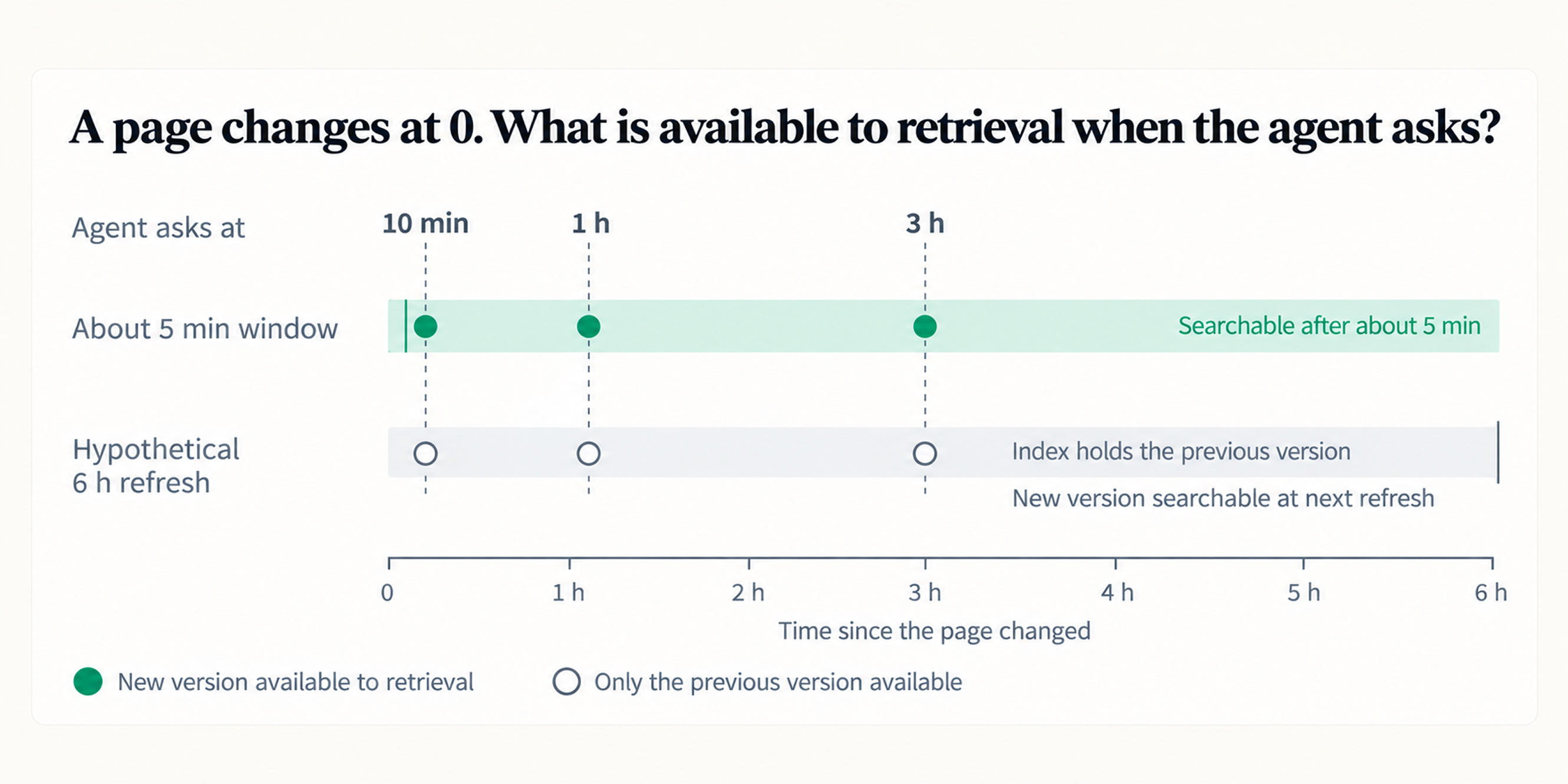
The crawl-to-searchable window defines the outer boundary of what your search layer can know about a newly changed page. Operationally, it dictates the exact moment your agent can reach an update. With a roughly five-minute window, a page published ten minutes ago can already be available to search and retrieve, but with a six-hour refresh interval, that same page may remain invisible to the search layer for hours, regardless of how capable the model is.
Once the page is searchable, the agent still has to retrieve the right result, read it correctly, and use it in the answer. Before the page enters the index, though, the retrieval layer has nothing new to return, and the model has only the old version to work from. The window sets the earliest point at which a correct answer based on that changed page becomes possible. After that, you can improve the odds that the fresh page is the one your agent uses by filtering on crawl or publish time for time-sensitive queries, including the current date in your prompt, and telling the model to prefer the most recent source when results disagree.
The same limit applies to LLM grounding, which makes an answer traceable to a source. A traceable answer drawn from a stale copy can still be wrong when the underlying information changes. That kind of error is also harder to catch, because the citation looks legitimate.
What can an agent answer with real-time search that it cannot answer without it?
Real-time web search gives an agent access to newly published and changed information on the open web, subject to the search provider's coverage and indexing window. Unless you already feed the agent a current source for that information, such as an event stream or a market data provider, that covers a few categories.
-
Breaking news: Announcements, outages, regulatory decisions, and results that happened this morning
-
Live prices and availability: Product pricing, stock levels, rates, and plan changes on vendor pages
-
Just-shipped docs and changelogs: A new SDK release, a deprecated parameter, or a migration note published an hour ago
-
Competitive moves: A rival's launch, pricing change, or new comparison page
-
Freshly published anything: Filings, posts, papers, and job listings in their first hours online
For teams building vertical search, each of these becomes a specific freshness question about the product. A news product asks how quickly an event enters the index. A finance agent asks how quickly a price or rate update becomes searchable, since a quote from an old rate can be wrong for the user's current context. A compliance monitor asks how quickly a regulatory change becomes visible, and a competitive intelligence tool asks how quickly it can detect a rival's pricing or product change.
That demand led us to ship a dedicated News Search API that finds breaking stories within minutes of publication and groups coverage of the same event into subjects. Its index is built for news coverage, so it answers questions about reported events, with a summary and a representative article for each subject. Web Search covers the rest of the web, including pricing pages, docs, changelogs, and product listings that change without making news, and the five-minute window applies there. Most agents need Web Search by default and News Search for questions about the news itself. Both expose publication and crawl timestamps in their results.
Octen's five-minute window
With the window established, the next question is what ours looks like. We report that pages are indexed within five minutes of publication and that the index updates continuously, ingesting new pages in seconds and refreshing in minutes. That figure applies to content our crawlers cover, so the number that matters most for your agent is the one you measure on the domains it depends on. The published five-minute figure is specifically about indexing after publication. For pages that are updated after publication, the probe gives you a way to measure the crawl-to-searchable window yourself.
Freshness is fastest where the web changes fastest. Major news sites and popular docs pages are recaptured within minutes, while a small regional outlet or a page that rarely changes may take longer to appear, so the probe on the domains your agent uses is the best guide to the window you will see.
Freshness and latency measure different things, and an agent needs both. Freshness is how recently the index learned about the web, and latency is how quickly you can retrieve from it. A fast query against an index that has yet to capture a page change still returns the old version, while a fresh index behind a slow query path stalls the agent's loop. On query speed, our Web Search docs cite P50 latency as low as 62 ms. In Artificial Analysis's Search API benchmark, Octen had the fastest time per search query of all 27 configurations tested (October 19, 2026 data), at 0.21 seconds. Our latency piece covers query speed and concurrency in detail.
What matters more than the figure itself is that you can check it. You can inspect the timestamps behind it on every result and test the window against content you control. Every result from the Web Search API includes time_published (when the page says it was published) and time_last_crawled (when we last captured it). You can filter on either one with time_basis, which accepts published, crawled, or auto, together with time_range or explicit start_time and end_time values. Filtering on crawl time asks our index directly what it captured recently, turning the five-minute figure into something you can see on every response.
See it in action with the live web freshness probe
The timestamps stated in the last section are what the probe reads. The Octen freshness probe is a small open-source CLI that queries pages we captured in the last N minutes and reports how old each result is. You need Node 18.17 or later (we tested on Node 22) and an API key, and new accounts get $5 of free balance. Each probe run or watch-mode poll is one Search API call, currently $1 per 1,000 calls at our promotional rate against a $5 list price, so a one-hour watch at one-minute intervals costs 60 calls.
The strongest test uses a page you control, because you know exactly when it changed. Publish or update a page on your own site, such as a changelog entry or a pricing change, then start the probe in watch mode with a query that matches the page and your domain. The example below watches for a changed pricing page.
git clone https://github.com/Octen-Team/octen-freshness-probe
cd octen-freshness-probe
npm install
export OCTEN_API_KEY=your-key-here
npm run probe -- "pricing" --domain yoursite.com --watch --interval 60
Watch mode records what is already in the window, then polls once a minute. For each new page, it records when the probe first observes the page and includes its time_last_crawled value. The gap between your change and the first poll that returns the page gives you a practical bound on the crawl-to-searchable window, with the accuracy limited by your polling interval. Each new page appears in this format.
[2026-09-29T14:05:00.412Z] new: Pricing | Your Product
  https://yoursite.com/pricing
  first seen by probe  2026-09-29T14:05:00.412Z
  last crawled         2026-09-29T14:03:47Z
  published            2026-09-29T14:00:00Z
You can also run the probe without --watch on any recent topic, and it prints each result's publish and crawl timestamps. Our index records time_last_crawled itself, while time_published comes from each site's own metadata, and publishers set that field with varying precision. Testing on your own page gives you the most accurate reading because you know the true change time, and the probe supplies the rest. The README covers the other flags, including --news.
When five minutes matters (and when it doesn't)
The probe measures the window, and the next decision is whether your agent needs it. Real-time indexing matters most for agents that answer questions about the current world. For questions about stable facts, such as how TCP handshakes work, what a 2019 statute says, or a company's history, a week-old index gives the same answer as a five-minute one, so you should weigh other factors, like coverage, result quality, and cost.
Does your agent need this? Run through these questions about your own workload.
-
Do users ask about events, prices, or states that change within a day?
-
Does a wrong answer about something recent cost money, trust, or compliance exposure?
-
Does your agent monitor sources and act on changes (alerts, trading signals, competitive tracking)?
-
Do your users say "latest," "today," "right now," or "just announced" in their questions?
-
Are you grounding answers in docs or changelogs that ship several times a week?
If several of these describe your workload, crawl-to-searchable time belongs on your evaluation list alongside latency, coverage, and result quality. If none of them do, a slower index will likely serve you well.
Whichever provider you evaluate, us included, test freshness on examples you pick, because a provider's own number comes from a mix of content that may look nothing like yours. The probe calls Octen, and the method carries over to any provider that returns crawl timestamps.
Wrapping up
Freshness is an infrastructure property of the retrieval layer, so measure crawl-to-searchable time on the sources your agent relies on before you choose a search provider. We put the timestamps on every result so you can take that measurement against our index.
We described the underlying need in How machines search with Octen: "Continuously running systems need to keep refreshing their understanding, because the world doesn't stop changing when training ends, and it doesn't stop changing when the first retrieval completes."
The quickest way to see if an API meets your agent's freshness requirements is to measure it. Get a free Octen API key, run the freshness probe against three pages or topics that changed recently in your domain, and inspect the crawl timestamps yourself. If the window you measure fits your workload, the quickstart shows how to wire Octen's search into your agent through the REST API, the Python SDK, the CLI, or our MCP server.